Table of contents
TrueMapData
TrueMapData is a Python library and tmd-process CLI for TrueMap and GelSight height maps, maintained under ETSim. It reads surface captures as NumPy arrays and provides analysis and graphics export. Facts below come from the repository README and guides as read for the companion article.
1. Overview
Why it exists. One surface representation that serves metrology work and graphics assets such as displacement maps or meshes.
Best fit. Inspecting measured surfaces, comparing captures over time (wear), and exporting normal maps, displacement maps or meshes with physical scale preserved.
2. Use cases
Python library and tmd-process CLI that read TrueMap and GelSight .tmd height maps for metrology, wear and 3D export.
- Load a .tmd height map
- Tribology researcherTrueMap / GelSight
TMD.load("file.tmd") in tmd/core/tmd.py decodes v1 or v2 headers and returns height_map as a float32 (height, width) array plus a metadata dict.
- Export texture maps
- Tribology researcher
tmd-process maps all|normal|ao|bump|hillshade|displacement writes PNG maps through the generators in tmd/image/maps/, and maps batch processes a whole folder.
- Export a 3D mesh
- Tribology researcher
tmd-process mesh generate exports STL, OBJ, PLY, glTF or USD with adaptive or quadtree triangulation; mesh apply puts the maps on a template OBJ/MTL such as tmd/fixtures/templates/plane.
- Measure ISO 25178 roughness
- Tribology researcherSurfalize (ISO 25178)
tmd-process roughness file <path> --quick computes areal parameters through the optional truemapdata[roughness] extra, which installs Surfalize under GPL-3.0.
- Track wear across scans
- Tribology researcherTrueMap / GelSight
tmd-wear (same as tmd-process wear) computes bearing curves, wear-volume series, slip axis and scratch evolution on aligned sequences, using tmd/sequence/wear_analysis.py.
- Plot surfaces and profiles
- Tribology researcher
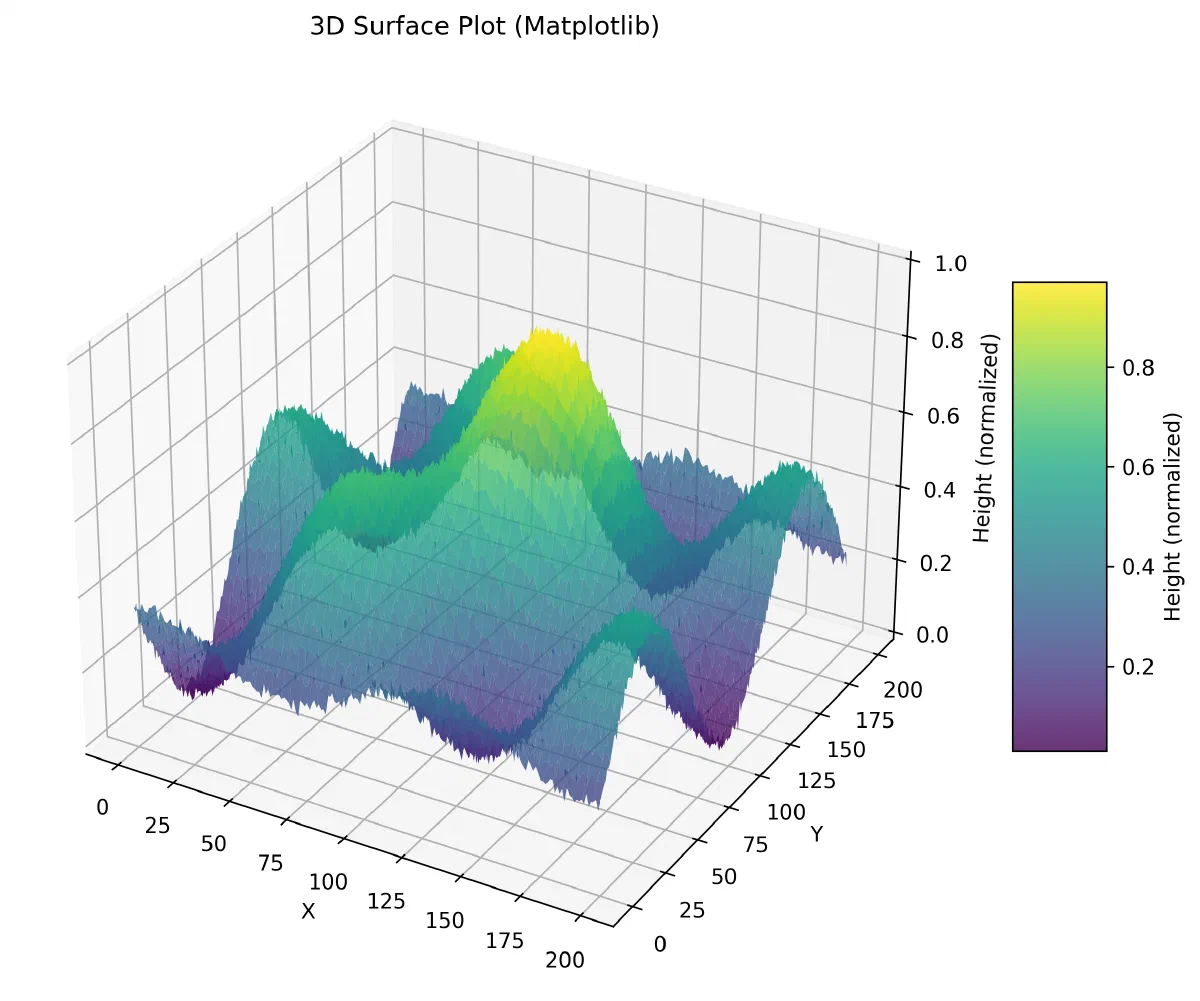
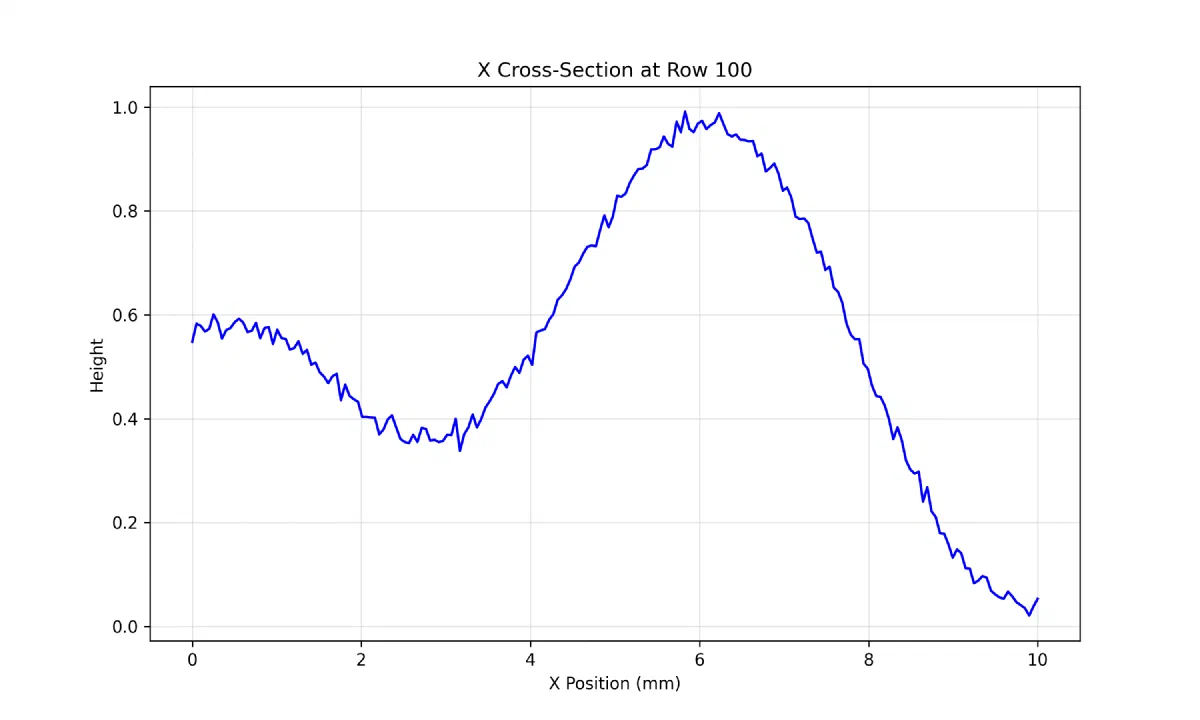
tmd-process visualize basic <file> draws 2D heatmaps, 3D surfaces and X/Y profiles with the matplotlib, plotly, seaborn or optional Polyscope plotters; tribology plot writes a PNG dashboard.
2.1. Scenario: Compare two GelSight captures of a worn sample
- Install the package with pip install truemapdata, or pip install -e . from a clone.
- Run tmd-wear bearing curve examples/gelsight/circle_0mm_100g_heightmap_linear_detrend.tmd --json to get the Abbott curve of the first capture.
- Run tmd-wear volume-series with that file and tests/fixtures/gelsight_wear_volume_second_frame.tmd to measure the volume lost between frames.
- Export textures with tmd-process maps all <file> -o ./maps_out.
- Build a mesh with tmd-process mesh generate <file> --format stl --method adaptive --quality high for a 3D view of the worn area.
Files readREADME.mdpyproject.tomldocs/reference/cli.mddocs/user-guide/getting-started.mdtmd/core/tmd.pytmd/cli/main.pytmd/sequence/wear_analysis.py
3. Getting started
Package. TrueMapData is on PyPI as truemapdata (MIT, Python 3.8 or later). The latest release on PyPI is 1.0.5; the repository’s pyproject.toml is already at 1.0.6. There is no .NET or NuGet package: the library is Python only, and the import name is tmd.
pip install truemapdata
The extras pull in optional features. Each one is declared in pyproject.toml:
| Extra | Adds | Use it for |
|---|---|---|
viz | PyVista, ipywidgets, Kaleido | 3D views and static Plotly export |
mesh | trimesh, pygltflib, numpy-stl | STL, OBJ, PLY and glTF export |
advanced | Polyscope, scikit-image, Open3D | Interactive viewer and image processing |
roughness | Surfalize (GPL-3.0, Python 3.10+) | ISO 25178 areal roughness; kept out of full because of its licence |
full | dev, docs, viz, mesh and advanced, plus pandas and nbformat | Working on the library itself |
pip install "truemapdata[mesh,viz]"
pip install "truemapdata[roughness]"
Installing the package adds two commands, tmd-process (the full toolkit) and tmd-wear (the wear subset).
A first script. This example follows tests/core/test_tmd.py, so it runs without a capture file: it builds a height map in memory, saves it in the TMD v2 format, reads it back and looks at it.
import numpy as np
from tmd import TMD

# A 200 x 200 grid of heights, 0.05 mm between samples
y, x = np.mgrid[0:200, 0:200]
heights = (np.sin(x / 25) * np.cos(y / 30)).astype(np.float32)

surface = TMD(heights, {"comment": "synthetic", "resolution_x": 0.05, "resolution_y": 0.05})
path = surface.save("synthetic.tmd")            # version 2 by default, returns the .tmd path

loaded = TMD.load(path)
print(loaded.shape)                              # (200, 200)
print(loaded.dimensions)                         # width and height in physical units: 10.0 x 10.0
print(loaded.stats["min"], loaded.stats["max"])  # computed on first access

patch = loaded.crop(50, 50, 64, 64)              # x_start, y_start, width, height
small = loaded.resize(100, 100)
TMD.load raises FileNotFoundError or TMDProcessingError for a missing file, and dimensions multiplies the grid size by resolution_x and resolution_y from the metadata (1.0 when they are missing). With a real capture, replace the synthetic grid with TMD.load("capture.tmd"). The repository tracks sample captures for this: TrueMap files in examples/v1/ and examples/v2/ (a dime, a step height, coins, paper, and in v2 a laser marking and a Vickers indentation) and three GelSight captures in examples/gelsight/ taken after 0, 150 and 300 mm of sliding at 100 g.
From the command line. The README’s wear examples run on those fixtures:
tmd-process visualize basic examples/v2/Dime.tmd
tmd-wear bearing curve examples/gelsight/circle_0mm_100g_heightmap_linear_detrend.tmd --json
tmd-wear volume-series examples/gelsight/circle_0mm_100g_heightmap_linear_detrend.tmd \
  tests/fixtures/gelsight_wear_volume_second_frame.tmd --json
The first wear command prints the bearing (Abbott–Firestone) curve of one capture; the second compares captures of the same grid and reports the loss against the first one (z_ref - z_i, positive where the surface went down).
4. Features and components
| Area | Content |
|---|---|
| File format | .tmd header, spatial metadata and a float32 row-major height grid; legacy v1 and TrueMap v6-style v2 formats, with checks for alternate v2 headers |
| Visualisation | 2D heatmap, 3D surface, row and column profiles, contours, file comparisons; Matplotlib, Plotly HTML, optional Polyscope |
| Derived maps | Normal maps, displacement maps, apply-on-mesh with a template OBJ/MTL using template bounds, mm_per_pixel and capture dimensions for tiling |
| Metrology | ISO 25178 areal roughness through Surfalize (optional) |
| Wear | tmd-wear commands: volume series, scratch evolution, slip-axis heuristics, roughness trajectories; translation alignment and OpenCV/SIFT registration, including normals-driven registration |
| Pipeline tools | Filters, defect detection, sequence export, compression |
5. Architecture
flowchart TB
  Capture["TrueMap or GelSight capture"] --> Read["Height grid and spatial metadata"]
  Read --> Inspect["Heatmap, profile or 3D surface"]
  Inspect --> Metrics["Roughness and surface metrics"]
  Inspect --> Maps["Normal and displacement maps"]
  Inspect --> Mesh["Mesh export and template texturing"]
6. Constraints and checks
- Roughness describes one capture; wear compares captures over time and needs the same grid and in-plane region before heights are subtracted.
- Loss convention:
reference height − current height; positive loss means the current surface is lower. Physical volume also needs the pixel spacing in both directions. - Registration errors or inconsistent height units change wear results.
- The README figures are repository examples with normalised heights, not thesis measurements.
7. Links
- Repository
- PyPI package
truemapdata tests/core/test_tmd.py, the source of the usage example- Documentation
- Binary format guide · Sequential wear analysis
- MistubaVideo renders the recorded surface fields this tooling measures
8. CI/CD pipeline
7 GitHub Actions workflows, 9 jobs. Each box is a job; double-bordered boxes publish or deploy, and arrows follow needs.
Mermaid Pipeline flow
flowchart LR
  subgraph wf0["Build"]
    direction LR
    wf0_build["build<br/>ubuntu-latest"]
  end
  subgraph wf1["Dependabot Auto-Merge"]
    direction LR
    wf1_dependabot["dependabot<br/>ubuntu-latest"]
  end
  subgraph wf2["Dependency submission"]
    direction LR
    wf2_dependency_submission["dependency-submission<br/>ubuntu-latest"]
  end
  subgraph wf3["Documentation"]
    direction LR
    wf3_build[["build<br/>ubuntu-latest"]]
    wf3_deploy[["deploy<br/>ubuntu-latest"]]
  end
  subgraph wf4["Release and publish"]
    direction LR
    wf4_test[["test<br/>ubuntu-latest"]]
    wf4_release_and_pypi[["release-and-pypi<br/>ubuntu-latest"]]
  end
  subgraph wf5["Ruff"]
    direction LR
    wf5_ruff["ruff<br/>ubuntu-latest"]
  end
  t0(["push · pull request"])
  t1(["pull request"])
  t2(["push · pull request · manual run"])
  t3(["manual run"])
  d0[("GitHub Pages")]
  d1[("PyPI")]
  d2[("GitHub Releases")]
  t0 --> wf0_build
  t1 --> wf1_dependabot
  t2 --> wf2_dependency_submission
  t0 --> wf3_build
  wf3_build --> wf3_deploy
  wf3_deploy -.-> d0
  t3 --> wf4_test
  wf4_test --> wf4_release_and_pypi
  wf4_release_and_pypi -.-> d1
  wf4_release_and_pypi -.-> d2
  t0 --> wf5_ruff
| Workflow | Triggers | Jobs | Publishes to |
|---|---|---|---|
Build.github/workflows/build.yml | push, pull request |
| — |
Dependabot Auto-Merge.github/workflows/dependabot-auto-merge.yml | pull request |
| — |
Dependency submission.github/workflows/dependency-submission.yml | push, pull request, manual run |
| — |
Documentation.github/workflows/docs.yml | push, pull request |
| GitHub Pages |
Release and publish.github/workflows/publish.yml | manual run |
| PyPI, GitHub Releases |
Ruff.github/workflows/ruff.yml | push, pull request |
| — |
Test.github/workflows/test.yml | push, pull request |
| — |
Generated from the source at commit 8e44bd4.
9. Deployment diagram
Mermaid Deployment diagram
flowchart LR
  repo[("GitHub repository")]
  ci[["GitHub Actions<br/>7 workflows"]]
  pub_GitHub_Pages[("GitHub Pages")]
  pub_PyPI[("PyPI")]
  pub_GitHub_Releases[("GitHub Releases")]
  host_MkDocs_site("Documentation site (MkDocs)<br/>mkdocs.yml")
  repo -->|"push or pull request"| ci
  ci -->|"publishes"| pub_GitHub_Pages
  ci -->|"publishes"| pub_PyPI
  ci -->|"publishes"| pub_GitHub_Releases
  ci -.->|"configured"| host_MkDocs_site
10. External dependencies
44 declared packages (19 runtime, 25 development) in pyproject.toml, requirements.txt.
Package table 44
| Package | Version | Scope | Purpose | Registry |
|---|---|---|---|---|
numpy | >=1.20.0 | runtime | Data analysis | pypi.org |
matplotlib | >=3.5.0 | runtime | Charts | pypi.org |
pillow | >=9.0.0 | runtime | Graphics, imaging and 3D | pypi.org |
scipy | >=1.8.0 | runtime | Data analysis | pypi.org |
opencv-python | >=4.5.0 | runtime | Graphics, imaging and 3D | pypi.org |
rich | >=12.0.0 | runtime | Command line | pypi.org |
typer | >=0.7.0 | runtime | Command line | pypi.org |
plotly | >=5.10.0 | runtime | Charts | pypi.org |
seaborn | >=0.12.0 | runtime | Charts | pypi.org |
meshio | >=5.0.0 | runtime | Graphics, imaging and 3D | pypi.org |
psutil | >=5.8.0 | runtime | Cross-platform lib for process and system monitoring. | pypi.org |
noise | >=1.2.2 | runtime | Perlin noise for Python | pypi.org |
pytest | >=7.0.0 | development | Testing | pypi.org |
pytest-cov | >=4.0.0 | development | Testing | pypi.org |
black | >=23.0.0 | development | Linting and formatting | pypi.org |
isort | >=5.10.0 | development | Linting and formatting | pypi.org |
flake8 | >=5.0.0 | development | Linting and formatting | pypi.org |
mypy | >=1.0.0 | development | Linting and formatting | pypi.org |
tox | >=4.0.0 | development | tox is a generic virtualenv management and test command line tool | pypi.org |
pre-commit | >=3.0.0 | development | Linting and formatting | pypi.org |
mkdocs | >=1.6.0 | development | Project documentation with Markdown. | pypi.org |
mkdocs-material | >=9.7.0 | development | Documentation that simply works | pypi.org |
pymdown-extensions | >=9.0 | development | Extension pack for Python Markdown. | pypi.org |
pygments | >=2.13.0 | development | Pygments is a syntax highlighting package written in Python. | pypi.org |
pyvista | >=0.37.0 | development | Graphics, imaging and 3D | pypi.org |
ipywidgets | >=7.6.0 | development | Jupyter interactive widgets | pypi.org |
kaleido | >=0.2.1 | development | Plotly graph export library | pypi.org |
trimesh | >=3.9.0 | development | Graphics, imaging and 3D | pypi.org |
pygltflib | >=1.15.0 | development | Python library for reading, writing and managing 3D objects in the Khronos Group gltf and gltf2 formats. | pypi.org |
numpy-stl | — | development | Data analysis | pypi.org |
polyscope | >=1.3.0 | development | Polyscope: A viewer and user interface for 3D data. | pypi.org |
scikit-image | — | development | Graphics, imaging and 3D | pypi.org |
open3d | — | development | Graphics, imaging and 3D | pypi.org |
surfalize | >=0.16.0 | development | A python module to analyze surface roughness | pypi.org |
truemapdata | — | development | A library for processing TMD files and visualizing height maps | pypi.org |
pandas | >=1.3.0 | development | Data analysis | pypi.org |
nbformat | >=5.1.0 | development | The Jupyter Notebook format | pypi.org |
tqdm | >=4.60.0 | runtime | Command line | pypi.org |
openstl | — | runtime | A simple STL serializer and deserializer | pypi.org |
python-pptx | — | runtime | Create, read, and update PowerPoint 2007+ (.pptx) files. | pypi.org |
PyWavelets | — | runtime | PyWavelets, wavelet transform module | pypi.org |
moviepy | — | runtime | Graphics, imaging and 3D | pypi.org |
usd-core | — | runtime | Pixar's Universal Scene Description | pypi.org |
rasterio | — | runtime | Fast and direct raster I/O for use with NumPy | pypi.org |
11. Glossary
Repository
The versioned source files, configuration, and history of a project.
README
The repository’s entry document, usually covering its purpose and initial setup.
Dependency
A library, tool, or service that another component needs to build or run.
HTTP
A request-and-response protocol used by browsers and web services. A method, path, headers, and optional body describe a request.
Volume and bind mount
A volume is storage managed by the container platform; a bind mount exposes a chosen host path inside a container.
Published port
A host port mapped to a service’s container port. Publishing a port can expose that service beyond its container network.
CLI
A text interface in which commands and arguments select operations. Exit codes let scripts detect success or failure.
Build
The steps that turn source files and dependencies into a runnable program or distributable artifact.
Continuous integration
Automated checks that run when source changes, such as building, testing, and linting. Passing checks cover only what those checks exercise.
Mermaid
A text-based diagram language. Nodes and connections describe a model; the diagram itself does not execute the project.
GPU
A processor designed for parallel workloads, including graphics rendering and many numerical operations.
Mesh
A surface represented by vertices and connected elements, often triangles. Its geometry is distinct from its material or texture.
12. References
- ETSim. (2026, November 5). [Web page] github.com.
- ETSim. (2026, November 5). TrueMapData. [Software repository] github.com.
- Documentation. (2026, November 5). [Web page] etsim.github.io.
- ETSim. (2026, November 5). Binary format guide. [Source file or documentation] github.com.
- ETSim. (2026, November 5). Sequential wear analysis. [Source file or documentation] github.com.
Sources without a publication date show the date they were last checked, November 5, 2026. File links retain the inspected revision where available.