Table of contents
Pan-Tilt-Controller: Keyboard input to serial motor commands
This archived pan-tilt controller connects a desktop interface to a serial-controlled positioning unit. The implementation mixes a Qt event loop with pyserial commands and keeps the requested pan and tilt positions in global state.
- Languages
- 1Code breakdown
- Documented components
- 2Explore modules
- Source documents
- 1Read the instructions
Repository languagesPython 100%1
Shares calculated from GitHub Linguist bytes.
| Language | % | Bytes |
|---|---|---|
| Python | 9,538 |
1. Overview
1.1. Why it exists
Serial interface and motion control daemon for Directed Perception PTU-46 precision pan-tilt robotic camera units.
1.2. Best fit
Automated camera positioning for computer vision experiments.
2. Use cases
Python 2 desktop and command-line tools that drive a PTU-46-17.5 pan-tilt unit over a serial port.
- Initialize the unit on start
- PTU-46-17.5 unit
On start, pantiltcontroller.py opens COM3 at 9600 baud and sends speed, acceleration, reset, home position and pan and tilt limit commands (pxu1500, pnu-1000, tnu-850, txu585).
- Move to a pan/tilt position
- Lab operatorPTU-46-17.5 unit
The PyQt5 window in pantiltcontroller.py has Pan and Tilt fields; OK sends pp<value> and tp<value> and shows the unit's reply in a log box.
- Jog with arrows or buttons
- Lab operatorPTU-46-17.5 unit
The Control menu (Ctrl+O) opens a dialog whose arrow buttons, and the keyboard arrow keys, move pan or tilt by 5 positions per press.
- Return to home position
- Lab operatorPTU-46-17.5 unit
The Reset button sends pp0 and tp0 and sets the stored positions back to zero.
- Send raw serial commands
- Lab operatorPTU-46-17.5 unit
PTC-command.py is a prompt that forwards each typed line (for example r, pnu 1000, pp0) to the unit and prints the reply until exit is typed.
2.1. Scenario: Point the pan-tilt unit at a target
- Connect the PTU-46-17.5 to COM3 (the port is hard-coded) on a Windows PC with Python 2.7, pyserial, PyQt5 and pywin32.
- Run python pantiltcontroller.py; the script sets limits and moves the unit to 0,0.
- Type 500 in Pan and -200 in Tilt, then click OK.
- Open Control, Control and fine-tune with the arrow keys in steps of 5.
- Click Reset to bring the unit back to home.
Files readREADME.mdpantiltcontroller.pyPTC-command.pyold/PTC.pyold/PTC.kv
3. Getting started
These commands come from the repository documentation. They were not run during this review.
4. Repository references
Excerpts from the repository’s guides, in their original language. Links open the inspected source revision.
Prerequisites and first run
4.1. Requirement libary
README.md
5. Features and components 2
- Interface events
- pantiltcontroller.py imports PyQt5 and installs a key event filter. Arrow keys and buttons adjust a position variable, then build a pp or tp command. This differs from the older framework description in the README.
- Device initialization
- The module opens COM3 at 9600 baud and writes initialization commands at import time. The UI therefore has an immediate hardware dependency, before a user selects a port or confirms movement.
6. Architecture
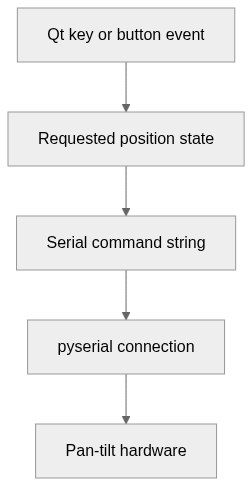
Expand a component to follow its connections, or explore the full diagram.
Qt key or button event
Requested position state
Serial command string
pyserial connection
Pan-tilt hardware
- From pyserial connection
Mermaid Interactive diagram
System overview of the components and connections verified in the repository.
flowchart LR
  n0["Qt key or button event"]
  n1["Requested position state"]
  n2["Serial command string"]
  n3["pyserial connection"]
  n4["Pan-tilt hardware"]
  n0 --> n1
  n1 --> n2
  n2 --> n3
  n3 --> n4
Text version of the diagram
- Qt key or button event → Requested position state
- Requested position state → Serial command string
- Serial command string → pyserial connection
- pyserial connection → Pan-tilt hardware
Follow one path through the code
Follow one arrow-key branch from positionPan or positionTilt to ser.write. The variable records the command target, not independently measured physical position.
7. Technical dossier
Built from the source at commit b565efd (4 files). Each item comes from a pattern match in the code, so open the linked file before relying on it.
7.1. Layers and modules
Folders are sorted into layers by name, from the user interface down to data access. Because the sorting uses names only, the diagram says nothing about calls between layers.
Mermaid Layered view
flowchart TB
  subgraph L_core["Core source"]
    direction TB
    core_0["(root)<br/>2 files"]
    core_1["old<br/>1 file"]
  end
7.2. C4 model
From system context to code declarations. Each level reflects the available source evidence.
UML 1 · System context
The widest C4 view: who uses the project and which outside systems and data stores it relies on. Rendered with uml-mcp.
PlantUML source
@startuml
!include <C4/C4_Context>
LAYOUT_LEFT_RIGHT()
System(SYS, "Pan-Tilt-Controller", "This archived pan-tilt controller connects a desktop interface to a s…")
@enduml
Level 2: the available sources do not support this view.
UML 3 · Components and layers
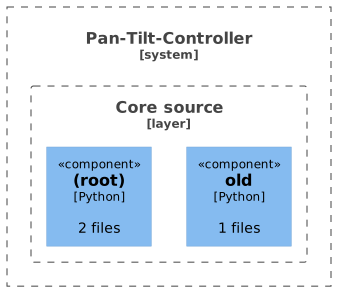
Modules grouped by source-layer classification. Boundaries show organization, not runtime isolation or call relationships. Rendered with uml-mcp.
PlantUML source
@startuml
!include <C4/C4_Component>
LAYOUT_TOP_DOWN()
System_Boundary(SYS, "Pan-Tilt-Controller") {
Boundary(L0, "Core source", "layer") {
Component(M0_0, "(root)", "Python", "2 files")
Component(M0_1, "old", "Python", "1 files")
}
}
@enduml
UML 4 · Code
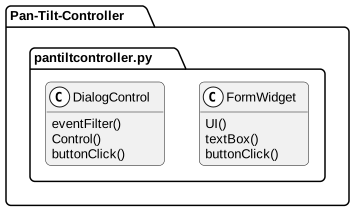
Selected declarations, fields and methods grouped by source file. No inheritance or call edges are inferred. Rendered with uml-mcp.
PlantUML source
@startuml
skinparam backgroundColor transparent
skinparam shadowing false
skinparam roundCorner 10
skinparam defaultFontName Arial
skinparam defaultFontSize 13
skinparam ArrowColor #4e6070
skinparam ArrowFontColor #3d4f5f
skinparam titleFontSize 14
skinparam actorBorderColor #006a62
skinparam actorBackgroundColor #e9f3f4
skinparam usecaseBorderColor #006a62
skinparam usecaseBackgroundColor #e9f3f4
skinparam componentBorderColor #006a62
skinparam componentBackgroundColor #e9f3f4
skinparam interfaceBorderColor #006a62
skinparam interfaceBackgroundColor #ffffff
skinparam nodeBorderColor #4e6070
skinparam nodeBackgroundColor #f4f8fb
skinparam databaseBorderColor #006a62
skinparam databaseBackgroundColor #ffffff
skinparam cloudBorderColor #4e6070
skinparam cloudBackgroundColor #f0f5fa
skinparam artifactBorderColor #006a62
skinparam artifactBackgroundColor #ffffff
skinparam rectangleBorderColor #b0c2d3
skinparam activityBorderColor #006a62
skinparam activityBackgroundColor #e9f3f4
skinparam partitionBorderColor #b0c2d3
skinparam stereotypeCBackgroundColor #ffffff
top to bottom direction
hide empty members
package "Pan-Tilt-Controller" {
package "pantiltcontroller.py" as F0 {
class "DialogControl" as T0_0 {
  eventFilter()
  Control()
  buttonClick()
}
class "FormWidget" as T0_1 {
  UI()
  textBox()
  buttonClick()
}
}
}
@enduml
7.3. Services
Controller 1
Controllerdo_move, do_reset
7.4. Business logic
Once UI code and the services and entities above are set aside, these classes have the most methods.
DialogControlCore source, 3 methodseventFilter, Control, buttonClickFormWidgetCore source, 3 methodsUI, textBox, buttonClick
7.5. CI/CD pipeline
No CI/CD pipeline in the repository. The code is built and run by hand, as described above.
7.6. Deployment
Mermaid Deployment diagram
flowchart LR
  repo[("GitHub repository")]
  local["Local machine"]
  repo -->|"clone and run"| local
The repository has no Dockerfile, Compose file or hosting configuration, so the code runs on the machine that clones it.
The available sources do not document the remaining sections.
8. Types and file structure
5 declared types, with 5 in the base-relationship overview.
Type diagram
classDiagram
direction TB
class t8cae8612b927["DialogControl"] {
  __init__()
  eventFilter()
  Control()
  buttonClick()
}
class tdb265aef05cf["MenuFile"] {
  __init__()
  Menu()
}
class t087f3f225d99["FormWidget"] {
  __init__()
  UI()
  textBox()
  buttonClick()
}
class t3ad2e1e58327["Controller"] {
  do_move()
  do_reset()
}
class t3c914b206877["PTC"] {
  build()
}
class b909aa1bfe7bf["QDialog"] {
  <<unresolved_base>>
}
b909aa1bfe7bf <|-- t8cae8612b927
class b368405a93f17["QWidget"] {
  <<unresolved_base>>
}
b368405a93f17 <|-- t8cae8612b927
class bc4c59610cef7["QMainWindow"] {
  <<unresolved_base>>
}
bc4c59610cef7 <|-- tdb265aef05cf
t8cae8612b927 <|-- tdb265aef05cf
b368405a93f17 <|-- t087f3f225d99
class bc742617f043e["Screen"] {
  <<unresolved_base>>
}
bc742617f043e <|-- t3ad2e1e58327
class b21d28968c3d5["App"] {
  <<unresolved_base>>
}
b21d28968c3d5 <|-- t3c914b206877
Unresolved bases remain labelled; full signatures are not reconstructed.
9. Reference
4 / 4 eligible files read (5 in the tree); 0 oversized, 0 failed reads and 0 syntax diagnostics.
What the scan covers
Known dependency/build folders, credential files and binaries are excluded. The scan covers READMEs, recognized manifests and parser-supported source files.
Linguist statistics cover the whole repository and may include other languages.
11. Files to read 3
12. Glossary
Repository
The versioned source files, configuration, and history of a project.
README
The repository’s entry document, usually covering its purpose and initial setup.
Dependency
A library, tool, or service that another component needs to build or run.
Published port
A host port mapped to a service’s container port. Publishing a port can expose that service beyond its container network.
CLI
A text interface in which commands and arguments select operations. Exit codes let scripts detect success or failure.
Build
The steps that turn source files and dependencies into a runnable program or distributable artifact.
Firmware
Software running on a device or microcontroller to control its hardware and communication.
13. References
- antoinebou12. (2026, November 5). Pan-Tilt-Controller. [Software repository] github.com.
- antoinebou12. (2026, November 5). Pan-Tilt-Controller: README. [Repository documentation] github.com.
- antoinebou12. (2026, November 5). pantiltcontroller.py. [Source file] github.com.
- antoinebou12. (2026, November 5). PTC-command.py. [Source file] github.com.
- antoinebou12. (2026, November 5). README.md. [Source file] github.com.
- Boucher, A. (2026, October 23). Pan-Tilt-Controller: Keyboard input to serial motor commands. [Project article] antoineboucher.info.
Sources without a publication date show the date they were last checked, November 5, 2026. File links retain the inspected revision where available.