Table of contents
marketwatch: A client around a virtual trading game
marketwatch is an archived Python client for MarketWatch’s virtual trading game. It wraps login, game queries and simulated order operations. These are game interactions, not connections to a brokerage account.
- Languages
- 4Code breakdown
- Documented components
- 2Explore modules
- Source documents
- 3Read the instructions
Repository languagesPython 77.68%4
Shares calculated from GitHub Linguist bytes.
| Language | % | Bytes |
|---|---|---|
| Python | 103,813 | |
| Jupyter Notebook | 17,674 | |
| Jinja | 10,228 | |
| Dockerfile | 1,934 |
1. Overview
1.1. Why it exists
Robust Python client library scraping and wrapping the MarketWatch virtual stock market game API.
1.2. Best fit
Automated trading bot development and portfolio backtesting.
2. Use cases
Python client for the MarketWatch stock game: quotes, trades, portfolios and watchlists (login now blocked by captcha).
- Get a stock price
- Game playerMarketWatch website
MarketWatch.get_price in marketwatch/__init__.py fetches the stock page with httpx and reads the intraday price with BeautifulSoup; the README marks it as working with skip_login=True.
- Buy, sell, short or cover
- Game playerMarketWatch website
buy, sell, short and cover build an order payload and submit it to a game; MarketWatchGame in marketwatch/game.py binds the same calls to one game ID.
- Read portfolio and orders
- Game playerMarketWatch website
get_portfolio, get_positions, get_pending_orders, get_leaderboard and get_game_settings scrape game pages; cancel_order and cancel_all_orders remove pending orders.
- Manage watchlists
- Game playerMarketWatch website
create_watchlist, add_to_watchlist, get_watchlists, delete_watchlist and delete_watchlist_item call the MarketWatch watchlist endpoints.
- Serve HTML game cards
- Game playerMarketWatch website
api/app.py is a FastAPI app with HTTP Basic auth that renders Jinja2 templates for /game, /portfolio, /leaderboard, /card and /watchlist.
- Trade on an EMA crossover
- GitHub ActionsMarketWatch website
.github/workflows/ema-workflow.yml runs on a five-minute cron, pulls prices with yfinance, computes 20 and 80 period EMAs and buys or sells 100 shares on a crossover.
2.1. Scenario: Check a quote, then trade in a game
- Install the package with pip install marketwatch.
- Create MarketWatch(email, password, skip_login=True) and call get_price("AAPL").
- For game calls, log in with real credentials; the README warns this step currently fails on a captcha.
- Once logged in, call get_games(), then buy(game_id, "AAPL", 100).
- Check the result with get_positions(game_id) and get_pending_orders(game_id).
Files readREADME.mdmarketwatch/__init__.pymarketwatch/game.pyapi/app.pyapi/setup.md.github/workflows/ema-workflow.ymlnotebook/ema.ipynb
3. Try it
Address published in the repository README. The page opens in a sandboxed frame, only when you ask.
https://antoinebou12.github.io/marketwatch/4. Getting started
These commands come from the repository documentation. They were not run during this review.
pip install marketwatchpip install git+https://github.com/antoinebou12/marketwatch.gitgit clone https://github.com/antoinebou12/marketwatch.git5. Repository references
Excerpts from the repository’s guides, in their original language. Links open the inspected source revision.
Configuration and usage
5.1. Usage
README.md
5.2. Usage (getting-started.md)
docs/getting-started.md
Development and contributions
5.3. Contributing
README.md
Source documentation
3 documents read from 3 candidates.
6. Features and components 2
- Session and game scope
- MarketWatchGame subclasses MarketWatch and stores a game identifier. Methods such as buy and sell delegate to the base client with that identifier. Ledger and portfolio operations are scoped by the game.
- Remote dependency
- The client depends on the website’s authentication and response structure. A Python method still existing does not mean its remote counterpart remains accessible. Authentication failure can block otherwise unchanged game methods.
7. Architecture
Expand a component to follow its connections, or explore the full diagram.
Python caller
MarketWatchGame wrapper
- From Python caller
- To Base HTTP client
Base HTTP client
Virtual game service
- From Base HTTP client
- To Base HTTP client
Mermaid Interactive diagram
System overview of the components and connections verified in the repository.
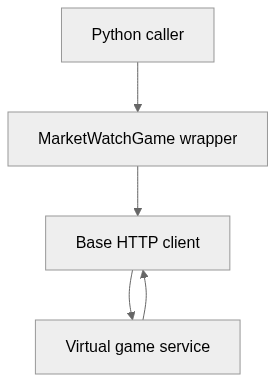
flowchart LR
  n0["Python caller"]
  n1["MarketWatchGame wrapper"]
  n2["Base HTTP client"]
  n3["Virtual game service"]
  n0 --> n1
  n1 --> n2
  n2 --> n3
  n3 --> n2
Text version of the diagram
- Python caller → MarketWatchGame wrapper
- MarketWatchGame wrapper → Base HTTP client
- Base HTTP client → Virtual game service
- Virtual game service → Base HTTP client
Follow one path through the code
Follow buy from the game wrapper into the base client. The wrapper adds the game ID; session handling and the actual HTTP request happen below it.
8. Technical dossier
Built from the source at commit 9a8bd76 (32 files). Each item comes from a pattern match in the code, so open the linked file before relying on it.
8.1. Layers and modules
Folders are sorted into layers by name, from the user interface down to data access. Because the sorting uses names only, the diagram says nothing about calls between layers.
Mermaid Layered view
flowchart TB
  subgraph L_interface["Entry points and API"]
    direction TB
    interface_0["api<br/>2 files"]
  end
  subgraph L_domain["Domain and business rules"]
    direction TB
    domain_0["marketwatch<br/>1 file"]
  end
  subgraph L_core["Core source"]
    direction TB
    core_0["marketwatch<br/>4 files"]
    core_1["(root)<br/>1 file"]
  end
  subgraph L_tests["Tests"]
    direction TB
    tests_0["test<br/>7 files"]
  end
  subgraph L_hosting["Build, CI and hosting"]
    direction TB
    hosting_0[".github<br/>10 files"]
    hosting_1[".devcontainer<br/>2 files"]
    hosting_2["api<br/>2 files"]
    hosting_3["(root)<br/>1 file"]
  end
  L_interface ~~~ L_domain
  L_domain ~~~ L_core
  L_core ~~~ L_tests
  L_core ~~~ L_hosting
| Module | Layer | Files | Types | Extensions |
|---|---|---|---|---|
marketwatch | Core source | 5 | 13 | .py |
api | Entry points and API | 2 | 0 | .py |
(root) | Core source | 1 | 0 | .py |
8.2. C4 model
From system context to code declarations. Each level reflects the available source evidence.
UML 1 · System context
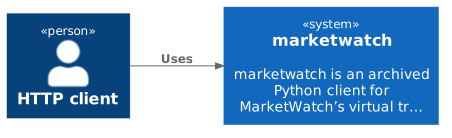
The widest C4 view: who uses the project and which outside systems and data stores it relies on. Rendered with uml-mcp.
PlantUML source
@startuml
!include <C4/C4_Context>
LAYOUT_LEFT_RIGHT()
Person(P_http, "HTTP client")
System(SYS, "marketwatch", "marketwatch is an archived Python client for MarketWatch’s virtual tr…")
Rel(P_http, SYS, "Uses")
@enduml
UML 2 · Containers
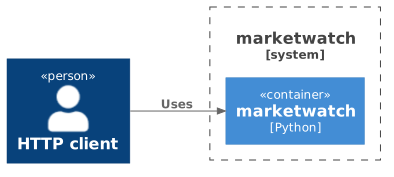
One level closer: the parts that run separately inside the project, their main language and how calls flow between them. Rendered with uml-mcp.
PlantUML source
@startuml
!include <C4/C4_Container>
LAYOUT_LEFT_RIGHT()
Person(P_http, "HTTP client")
System_Boundary(SYS, "marketwatch") {
  Container(APP, "marketwatch", "Python")
}
Rel(P_http, APP, "Uses")
@enduml
UML 3 · Components and layers
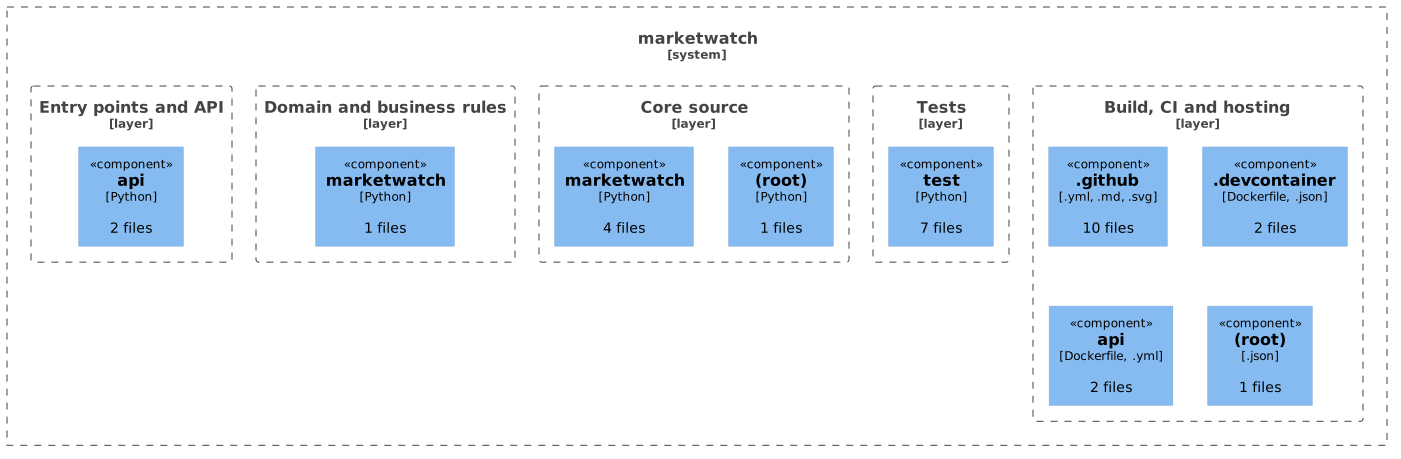
Modules grouped by source-layer classification. Boundaries show organization, not runtime isolation or call relationships. Rendered with uml-mcp.
PlantUML source
@startuml
!include <C4/C4_Component>
LAYOUT_TOP_DOWN()
System_Boundary(SYS, "marketwatch") {
Boundary(L0, "Entry points and API", "layer") {
Component(M0_0, "api", "Python", "2 files")
}
Boundary(L1, "Domain and business rules", "layer") {
Component(M1_0, "marketwatch", "Python", "1 files")
}
Boundary(L2, "Core source", "layer") {
Component(M2_0, "marketwatch", "Python", "4 files")
Component(M2_1, "(root)", "Python", "1 files")
}
Boundary(L3, "Tests", "layer") {
Component(M3_0, "test", "Python", "7 files")
}
Boundary(L4, "Build, CI and hosting", "layer") {
Component(M4_0, ".github", ".yml, .md, .svg", "10 files")
Component(M4_1, ".devcontainer", "Dockerfile, .json", "2 files")
Component(M4_2, "api", "Dockerfile, .yml", "2 files")
Component(M4_3, "(root)", ".json", "1 files")
}
}
@enduml
UML 4 · Code
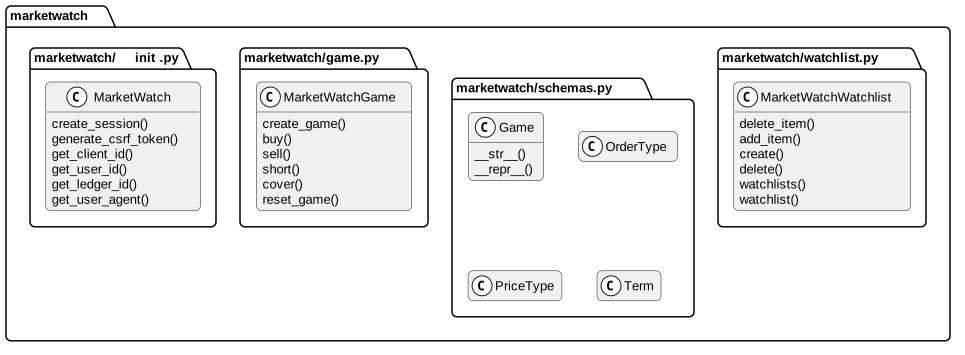
Selected declarations, fields and methods grouped by source file. No inheritance or call edges are inferred. Rendered with uml-mcp.
PlantUML source
@startuml
skinparam backgroundColor transparent
skinparam shadowing false
skinparam roundCorner 10
skinparam defaultFontName Arial
skinparam defaultFontSize 13
skinparam ArrowColor #4e6070
skinparam ArrowFontColor #3d4f5f
skinparam titleFontSize 14
skinparam actorBorderColor #006a62
skinparam actorBackgroundColor #e9f3f4
skinparam usecaseBorderColor #006a62
skinparam usecaseBackgroundColor #e9f3f4
skinparam componentBorderColor #006a62
skinparam componentBackgroundColor #e9f3f4
skinparam interfaceBorderColor #006a62
skinparam interfaceBackgroundColor #ffffff
skinparam nodeBorderColor #4e6070
skinparam nodeBackgroundColor #f4f8fb
skinparam databaseBorderColor #006a62
skinparam databaseBackgroundColor #ffffff
skinparam cloudBorderColor #4e6070
skinparam cloudBackgroundColor #f0f5fa
skinparam artifactBorderColor #006a62
skinparam artifactBackgroundColor #ffffff
skinparam rectangleBorderColor #b0c2d3
skinparam activityBorderColor #006a62
skinparam activityBackgroundColor #e9f3f4
skinparam partitionBorderColor #b0c2d3
skinparam stereotypeCBackgroundColor #ffffff
top to bottom direction
hide empty members
package "marketwatch" {
package "marketwatch/__init__.py" as F0 {
class "MarketWatch" as T0_0 {
  create_session()
  generate_csrf_token()
  get_client_id()
  get_user_id()
  get_ledger_id()
  get_user_agent()
}
}
package "marketwatch/game.py" as F1 {
class "MarketWatchGame" as T1_0 {
  create_game()
  buy()
  sell()
  short()
  cover()
  reset_game()
}
}
package "marketwatch/schemas.py" as F2 {
class "Game" as T2_0 {
  __str__()
  __repr__()
}
class "OrderType" as T2_1 {
}
class "PriceType" as T2_2 {
}
class "Term" as T2_3 {
}
}
package "marketwatch/watchlist.py" as F3 {
class "MarketWatchWatchlist" as T3_0 {
  delete_item()
  add_item()
  create()
  delete()
  watchlists()
  watchlist()
}
}
}
@enduml
8.3. Public interface
Outside code can use everything listed here. The project also declares 13 public types.
UML Use cases
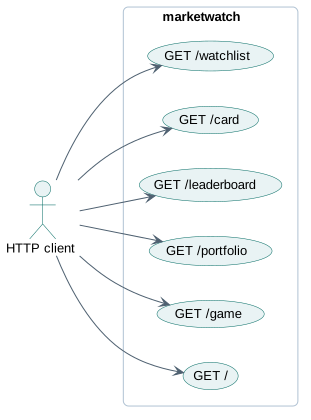
Each actor is a kind of caller, linked to what it can ask the project to do. Rendered with uml-mcp.
PlantUML source
@startuml
skinparam backgroundColor transparent
skinparam shadowing false
skinparam roundCorner 10
skinparam defaultFontName Arial
skinparam defaultFontSize 13
skinparam ArrowColor #4e6070
skinparam ArrowFontColor #3d4f5f
skinparam titleFontSize 14
skinparam actorBorderColor #006a62
skinparam actorBackgroundColor #e9f3f4
skinparam usecaseBorderColor #006a62
skinparam usecaseBackgroundColor #e9f3f4
skinparam componentBorderColor #006a62
skinparam componentBackgroundColor #e9f3f4
skinparam interfaceBorderColor #006a62
skinparam interfaceBackgroundColor #ffffff
skinparam nodeBorderColor #4e6070
skinparam nodeBackgroundColor #f4f8fb
skinparam databaseBorderColor #006a62
skinparam databaseBackgroundColor #ffffff
skinparam cloudBorderColor #4e6070
skinparam cloudBackgroundColor #f0f5fa
skinparam artifactBorderColor #006a62
skinparam artifactBackgroundColor #ffffff
skinparam rectangleBorderColor #b0c2d3
skinparam activityBorderColor #006a62
skinparam activityBackgroundColor #e9f3f4
skinparam partitionBorderColor #b0c2d3
skinparam stereotypeCBackgroundColor #ffffff
left to right direction
actor "HTTP client" as A_http
rectangle "marketwatch" {
  usecase "GET /" as U0
  usecase "GET /game" as U1
  usecase "GET /portfolio" as U2
  usecase "GET /leaderboard" as U3
  usecase "GET /card" as U4
  usecase "GET /watchlist" as U5
}
A_http --> U0
A_http --> U1
A_http --> U2
A_http --> U3
A_http --> U4
A_http --> U5
@enduml
HTTP routes 6
Mermaid Route map by prefix
flowchart LR
  api(["HTTP API"])
  g0["/"]
  api --> g0
  g0r0["GET /"]
  g0 --> g0r0
  g1["/card"]
  api --> g1
  g1r0["GET /card/'game_id'"]
  g1 --> g1r0
  g2["/game"]
  api --> g2
  g2r0["GET /game/'game_id'"]
  g2 --> g2r0
  g3["/leaderboard"]
  api --> g3
  g3r0["GET /leaderboard/'game_id'"]
  g3 --> g3r0
  g4["/portfolio"]
  api --> g4
  g4r0["GET /portfolio/'game_id'"]
  g4 --> g4r0
  g5["/watchlist"]
  api --> g5
  g5r0["GET /watchlist/'watchlist_id'"]
  g5 --> g5r0
| Method | Path | Source |
|---|---|---|
| GET | / | api/app.py:38 |
| GET | /game/{game_id} | api/app.py:42 |
| GET | /portfolio/{game_id} | api/app.py:47 |
| GET | /leaderboard/{game_id} | api/app.py:52 |
| GET | /card/{game_id} | api/app.py:57 |
| GET | /watchlist/{watchlist_id} | api/app.py:62 |
Entry points
api/app.pyentry file
8.4. Private interface
These names are internal by the language’s conventions: a leading underscore, private, static or pub(crate).
- underscore helper
- 8
_create_payloadmarketwatch/__init__.py:1206_get_ticker_uidmarketwatch/__init__.py:1258_submitmarketwatch/__init__.py:1269
8.5. Entities and data model 3
Mermaid Entity class diagram
classDiagram
  direction LR
  class E0["OrderType"] {
    <<enumeration>>
  }
  class E1["PriceType"] {
    <<enumeration>>
  }
  class E2["Term"] {
    <<enumeration>>
  }
An arrow links a field to the entity its type names.
8.6. Business logic
Once UI code and the services and entities above are set aside, these classes have the most methods.
MarketWatchCore source, 50 methodscreate_session, generate_csrf_token, get_client_id, get_user_id, get_ledger_id, get_user_agentMarketWatchGameCore source, 17 methodscreate_game, buy, sell, short, cover, reset_gameGameDomain and business rules, 2 methods__str__, __repr__MarketWatchWatchlistCore source, 7 methodsdelete_item, add_item, create, delete, watchlists, watchlist
8.7. External integrations
HTTP clients
Hosts named in the code
api.wsj.net1 filesmarketwatch/__init__.py:1061httpbin.org1 filesmarketwatch/__init__.py:90sso.accounts.dowjones.com1 filesmarketwatch/__init__.py:35www.google.com1 filesmarketwatch/__init__.py:77
8.8. Stack and dependencies
Python pyproject.toml 3 runtime
Python requirements.txt 3 runtime
Python api/requirements.txt 6 runtime
External dependencies
7 declared packages (7 runtime, 0 development) in pyproject.toml, requirements.txt, api/requirements.txt.
Package table 7
| Package | Version | Scope | Purpose | Registry |
|---|---|---|---|---|
beautifulsoup4 | ^4.12.0 | runtime | Scraping and parsing | pypi.org |
rich | ^13.3.2 | runtime | Command line | pypi.org |
fastapi | — | runtime | Web framework | pypi.org |
uvicorn | — | runtime | Application server | pypi.org |
marketwatch | — | runtime | MarketWatch's API | pypi.org |
jinja2 | — | runtime | Templates | pypi.org |
pydantic | — | runtime | Data validation | pypi.org |
8.9. CI/CD pipeline
5 GitHub Actions workflows, 5 jobs. Each box is a job; double-bordered boxes publish or deploy, and arrows follow needs.
Mermaid Pipeline flow
flowchart LR
  subgraph wf0["Check URLs"]
    direction LR
    wf0_build["build<br/>ubuntu-latest"]
  end
  subgraph wf1["Trade on EMA Crossover"]
    direction LR
    wf1_trade["trade<br/>ubuntu-latest"]
  end
  subgraph wf2["Python Docs"]
    direction LR
    wf2_build[["build<br/>ubuntu-latest"]]
  end
  subgraph wf3["Publish Python to PyPI"]
    direction LR
    wf3_deploy[["deploy<br/>ubuntu-latest"]]
  end
  subgraph wf4["Python Test and Build"]
    direction LR
    wf4_test["test<br/>matrix"]
  end
  t0(["push"])
  t1(["schedule"])
  t2(["push · pull request"])
  t3(["release · manual run"])
  t4(["push · pull request · manual run"])
  d0[("GitHub Pages")]
  d1[("PyPI")]
  t0 --> wf0_build
  t1 --> wf1_trade
  t2 --> wf2_build
  wf2_build -.-> d0
  t3 --> wf3_deploy
  wf3_deploy -.-> d1
  t4 --> wf4_test
| Workflow | Triggers | Jobs | Publishes to |
|---|---|---|---|
Check URLs.github/workflows/URL_Checker.yml | push |
| — |
Trade on EMA Crossover.github/workflows/ema-workflow.yml | schedule |
| — |
Python Docs.github/workflows/python-docs.yml | push, pull request |
| GitHub Pages |
Publish Python to PyPI.github/workflows/python-publish.yml | release, manual run |
| PyPI |
Python Test and Build.github/workflows/python-test.yml | push, pull request, manual run |
| — |
8.10. Deployment
Mermaid Deployment diagram
flowchart LR
  repo[("GitHub repository")]
  ci[["GitHub Actions<br/>5 workflows"]]
  image["Docker image<br/>FROM python:3.13.0a6-slim"]
  pub_GitHub_Pages[("GitHub Pages")]
  pub_PyPI[("PyPI")]
  host_Vercel("Vercel<br/>vercel.json")
  host_MkDocs_site("Documentation site (MkDocs)<br/>mkdocs.yml")
  repo -->|"push or pull request"| ci
  ci -->|"docker build"| image
  ci -->|"publishes"| pub_GitHub_Pages
  ci -->|"publishes"| pub_PyPI
  ci -.->|"configured"| host_Vercel
  ci -.->|"configured"| host_MkDocs_site
UML Deployment
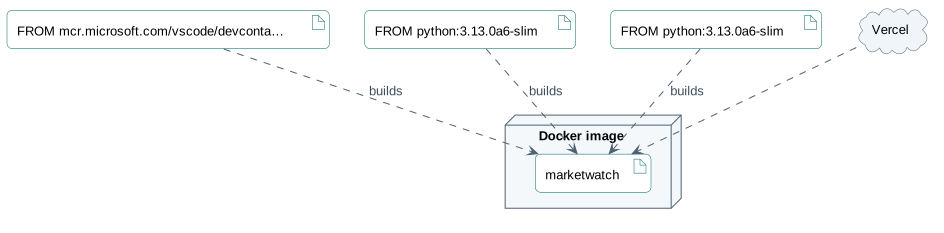
The outer node is where the code runs. Each base image points to what it builds, solid arrows lead to databases and dashed ones to outside services. Rendered with uml-mcp.
PlantUML source
@startuml
skinparam backgroundColor transparent
skinparam shadowing false
skinparam roundCorner 10
skinparam defaultFontName Arial
skinparam defaultFontSize 13
skinparam ArrowColor #4e6070
skinparam ArrowFontColor #3d4f5f
skinparam titleFontSize 14
skinparam actorBorderColor #006a62
skinparam actorBackgroundColor #e9f3f4
skinparam usecaseBorderColor #006a62
skinparam usecaseBackgroundColor #e9f3f4
skinparam componentBorderColor #006a62
skinparam componentBackgroundColor #e9f3f4
skinparam interfaceBorderColor #006a62
skinparam interfaceBackgroundColor #ffffff
skinparam nodeBorderColor #4e6070
skinparam nodeBackgroundColor #f4f8fb
skinparam databaseBorderColor #006a62
skinparam databaseBackgroundColor #ffffff
skinparam cloudBorderColor #4e6070
skinparam cloudBackgroundColor #f0f5fa
skinparam artifactBorderColor #006a62
skinparam artifactBackgroundColor #ffffff
skinparam rectangleBorderColor #b0c2d3
skinparam activityBorderColor #006a62
skinparam activityBackgroundColor #e9f3f4
skinparam partitionBorderColor #b0c2d3
skinparam stereotypeCBackgroundColor #ffffff
node "Docker image" as H {
  artifact "marketwatch" as APP
}
artifact "FROM mcr.microsoft.com/vscode/devconta…" as IMG0
IMG0 ..> APP : builds
artifact "FROM python:3.13.0a6-slim" as IMG1
IMG1 ..> APP : builds
artifact "FROM python:3.13.0a6-slim" as IMG2
IMG2 ..> APP : builds
cloud "Vercel" as X0
X0 ..> APP
@enduml
Where it runs
Published to
Docker base images
mcr.microsoft.com/vscode/devcontainers/python: python:3.13.0a6-slim python:3.13.0a6-slim
8.11. Security
Controls
Supply chain
Environment variables 2
The page lists names without their values and underlines the ones that look like secrets.
8.12. Testing
- Test files
- 7
- Source files
- 8
- Test cases, about
- 52
- Unit tests
- 7
Code coverage
No measured coverage report in the analyzed sources.
Where the tests are
test 7
Continuous integration
- Python Docs
ctest- Python Test and Build
pytest
UML CI pipeline
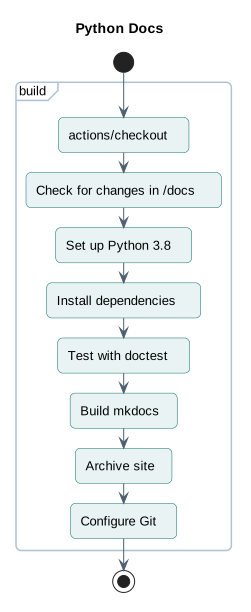
The main GitHub Actions workflow runs these steps. Jobs that run in parallel sit side by side. Rendered with uml-mcp.
PlantUML source
@startuml
skinparam backgroundColor transparent
skinparam shadowing false
skinparam roundCorner 10
skinparam defaultFontName Arial
skinparam defaultFontSize 13
skinparam ArrowColor #4e6070
skinparam ArrowFontColor #3d4f5f
skinparam titleFontSize 14
skinparam actorBorderColor #006a62
skinparam actorBackgroundColor #e9f3f4
skinparam usecaseBorderColor #006a62
skinparam usecaseBackgroundColor #e9f3f4
skinparam componentBorderColor #006a62
skinparam componentBackgroundColor #e9f3f4
skinparam interfaceBorderColor #006a62
skinparam interfaceBackgroundColor #ffffff
skinparam nodeBorderColor #4e6070
skinparam nodeBackgroundColor #f4f8fb
skinparam databaseBorderColor #006a62
skinparam databaseBackgroundColor #ffffff
skinparam cloudBorderColor #4e6070
skinparam cloudBackgroundColor #f0f5fa
skinparam artifactBorderColor #006a62
skinparam artifactBackgroundColor #ffffff
skinparam rectangleBorderColor #b0c2d3
skinparam activityBorderColor #006a62
skinparam activityBackgroundColor #e9f3f4
skinparam partitionBorderColor #b0c2d3
skinparam stereotypeCBackgroundColor #ffffff
title Python Docs
start
partition "build" {
  :actions/checkout;
  :Check for changes in /docs;
  :Set up Python 3.8;
  :Install dependencies;
  :Test with doctest;
  :Build mkdocs;
  :Archive site;
  :Configure Git;
}
stop
@enduml
Nothing found for: Services, Database, Monitoring.
9. Types and file structure
13 declared types, with 12 in the base-relationship overview.
Type diagram
classDiagram
direction TB
class t342c57589891["MarketWatch"] {
  __init__()
  create_session()
  generate_csrf_token()
  get_client_id()
}
class te2660179edef["MarketWatchGame"] {
  __init__()
  create_game()
  buy()
  sell()
}
class tc6adc7beb6df["MarketWatchException"] {
  __init__()
}
class tc9e9c1f2c012["MarketWatchGameException"] {
  __init__()
}
class td4c12f6259f0["Term"] {
}
class tb06037cc6ec7["PriceType"] {
}
class t3d7a45c40645["OrderType"] {
}
class t7d8a40bf3f38["GameSettings"] {
  __init__()
  __str__()
}
class tc2b2eb26d380["Order"] {
  __init__()
  __str__()
  __repr__()
}
class t45b8a20e40d7["Position"] {
  __init__()
  __str__()
  __repr__()
}
class t0783a857f7ca["Player"] {
  __init__()
  __str__()
  __repr__()
}
class t6ddf82fcb3c7["Game"] {
  __init__()
  __str__()
  __repr__()
}
class b4a739b8cc727["MarketWatch"] {
  <<unresolved_base>>
}
b4a739b8cc727 <|-- te2660179edef
class b218d46208022["Exception"] {
  <<unresolved_base>>
}
b218d46208022 <|-- tc6adc7beb6df
b218d46208022 <|-- tc9e9c1f2c012
class bcdccbbebe0a2["Enum"] {
  <<unresolved_base>>
}
bcdccbbebe0a2 <|-- td4c12f6259f0
bcdccbbebe0a2 <|-- tb06037cc6ec7
bcdccbbebe0a2 <|-- t3d7a45c40645
Unresolved bases remain labelled; full signatures are not reconstructed.
10. Reference
20 / 20 eligible files read (65 in the tree); 0 oversized, 0 failed reads and 0 syntax diagnostics.
What the scan covers
Known dependency/build folders, credential files and binaries are excluded. The scan covers READMEs, recognized manifests and parser-supported source files.
Linguist statistics cover the whole repository and may include other languages.
12. Files to read 3
13. Glossary
Repository
The versioned source files, configuration, and history of a project.
README
The repository’s entry document, usually covering its purpose and initial setup.
Dependency
A library, tool, or service that another component needs to build or run.
HTTP
A request-and-response protocol used by browsers and web services. A method, path, headers, and optional body describe a request.
Session
State kept across related requests, often to track a signed-in user. Authentication and permission checks remain separate concerns.
Container
An isolated process environment created from an image. Persistent data needs storage outside the container’s disposable filesystem.
Published port
A host port mapped to a service’s container port. Publishing a port can expose that service beyond its container network.
14. References
- antoinebou12. (2026, November 5). marketwatch. [Software repository] github.com.
- antoinebou12. (2026, November 5). marketwatch: README. [Repository documentation] github.com.
- antoinebou12. (2026, November 5). marketwatch/game.py. [Source file] github.com.
- antoinebou12. (2026, November 5). marketwatch/__init__.py. [Source file] github.com.
- antoinebou12. (2026, November 5). README.md. [Source file] github.com.
- Boucher, A. (2026, April 13). Python library for MarketWatch virtual trading. [Project article] antoineboucher.info.
- Boucher, A. (2021, September 6). MarketWatch API Python library. [Project article] antoineboucher.info.
- Boucher, A. (2026, October 23). marketwatch: A client around a virtual trading game. [Project article] antoineboucher.info.
Sources without a publication date show the date they were last checked, November 5, 2026. File links retain the inspected revision where available.