Table of contents
LLM2SVG: Dataset analysis before model claims
This LLM2SVG fork contains SVG dataset utilities and an evaluation-oriented scaffold. The visible implementation is useful for inspecting examples and constraints; it does not establish a completed or trained text-to-SVG model.
- Languages
- 1Code breakdown
- Documented components
- 2Explore modules
- Source documents
- 1Read the instructions
Repository languagesPython 100%1
Shares calculated from GitHub Linguist bytes.
| Language | % | Bytes |
|---|---|---|
| Python | 49,062 |
1. Overview
1.1. Why it exists
Structured prompt engineering framework and Python validator generating crisp, valid SVG illustrations from LLM responses.
1.2. Best fit
Automated vector icon and diagram generation for design systems.
2. Use cases
Python utilities and data for a text-to-SVG challenge: load prompts, check SVG rules, build and render shapes.
- Load prompts and SVG samples
- ML researcher
SVGDataLoader in utils/data_loader.py reads data/train/train.csv and data/test/test.csv and collects the SVG files stored under data/train/svg/<id>/; SVGDataset in utils/svg_dataset.py wraps them as a PyTorch Dataset.
- Validate SVG constraints
- ML researcher
SVGConstraints.validate_svg in utils/svg_constraints.py rejects files over 10,000 bytes and any element or attribute outside the allowlist, parsing with defusedxml.
- Extract terms from a prompt
- ML researcher
TextParser in utils/text_parser.py pulls colours, shapes, patterns, materials, clothing, landscape and architecture terms from a description and picks a primary category.
- Build SVG from primitives
- ML researcher
utils/svg_utils.py has helpers for rect, circle, ellipse, path, polygon, line and group elements, a colour palette generator, generate_shapes and optimize_svg to shorten numbers.
- Render SVG to PNG
- ML researchercairosvg renderer
svg_to_png in utils/svg_utils.py calls cairosvg.svg2png and either writes a file or returns PNG bytes.
- Report on the SVG dataset
- ML researcher
SVGAnalyzer in utils/svg_analyzer.py counts SVGs, measures their sizes, tallies elements, validates every file and plots a size histogram against the 10 KB limit.
2.1. Scenario: Check a set of candidate SVGs before submission
- Point SVGDataLoader at the local data/ folder (the default path is hard-coded to the author’s Windows drive).
- Read the prompts from data/train/train.csv, for example "a starlit night over snow-covered peaks".
- Run SVGAnalyzer.validate_all_svgs("train") to test every SVG under data/train/svg/ with SVGConstraints.
- Call generate_summary_report to get a table of sizes and inferred sources, then plot_svg_size_distribution.
- Render a passing SVG with svg_to_png to compare it with the prompt.
Files readREADME.mdutils/data_loader.pyutils/svg_dataset.pyutils/svg_constraints.pyutils/text_parser.pyutils/svg_utils.pyutils/svg_analyzer.pydata/train/train.csv
3. Getting started
These commands come from the repository documentation. They were not run during this review.
pip install cairosvg torch torchvision4. Repository references
Excerpts from the repository’s guides, in their original language. Links open the inspected source revision.
Prerequisites and first run
4.1. Submission Requirements
README.md
5. Features and components 2
- Loading and constraints
- SVGAnalyzer composes SVGDataLoader and SVGConstraints. It enumerates samples, records file sizes and checks constraints. Dataset loading and validation are separate responsibilities.
- Dataset reports
- The analyzer counts element names and builds per-sample validation results, with a summary-report method returning a pandas DataFrame. Element counting uses a regular expression to tolerate malformed SVG text.
6. Architecture
Expand a component to follow its connections, or explore the full diagram.
SVG dataset files
SVGDataLoader
Element and size analysis
- From SVGDataLoader
- To Dataset report
Constraint checks
- From SVGDataLoader
- To Dataset report
Dataset report
Mermaid Interactive diagram
System overview of the components and connections verified in the repository.
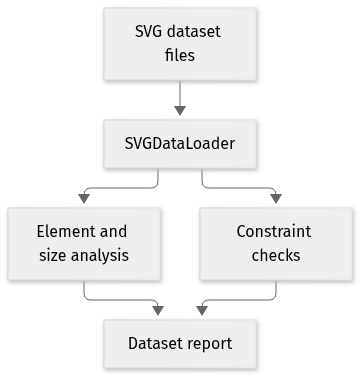
flowchart LR
  n0["SVG dataset files"]
  n1["SVGDataLoader"]
  n2["Element and size analysis"]
  n3["Constraint checks"]
  n4["Dataset report"]
  n0 --> n1
  n1 --> n2
  n1 --> n3
  n2 --> n4
  n3 --> n4
Text version of the diagram
- SVG dataset files → SVGDataLoader
- SVGDataLoader → Element and size analysis
- SVGDataLoader → Constraint checks
- Element and size analysis → Dataset report
- Constraint checks → Dataset report
Follow one path through the code
Follow validate_all_svgs and compare it with analyze_elements. Passing the declared constraints and having a plausible set of element names are different checks; neither establishes visual similarity to a text prompt.
7. Technical dossier
Built from the source at commit a833776 (8 files). Each item comes from a pattern match in the code, so open the linked file before relying on it.
7.1. Layers and modules
Folders are sorted into layers by name, from the user interface down to data access. Because the sorting uses names only, the diagram says nothing about calls between layers.
Mermaid Layered view
flowchart TB
  subgraph L_core["Core source"]
    direction TB
    core_0["utils<br/>7 files"]
  end
| Module | Layer | Files | Types | Extensions |
|---|---|---|---|---|
utils | Core source | 7 | 5 | .py |
7.2. C4 model
From system context to code declarations. Each level reflects the available source evidence.
UML 1 · System context
The widest C4 view: who uses the project and which outside systems and data stores it relies on. Rendered with uml-mcp.
PlantUML source
@startuml
!include <C4/C4_Context>
LAYOUT_LEFT_RIGHT()
System(SYS, "LLM2SVG", "This LLM2SVG fork contains SVG dataset utilities and an evaluation-or…")
@enduml
Level 2: the available sources do not support this view.
UML 3 · Components and layers
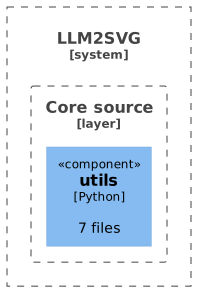
Modules grouped by source-layer classification. Boundaries show organization, not runtime isolation or call relationships. Rendered with uml-mcp.
PlantUML source
@startuml
!include <C4/C4_Component>
LAYOUT_TOP_DOWN()
System_Boundary(SYS, "LLM2SVG") {
Boundary(L0, "Core source", "layer") {
Component(M0_0, "utils", "Python", "7 files")
}
}
@enduml
UML 4 · Code
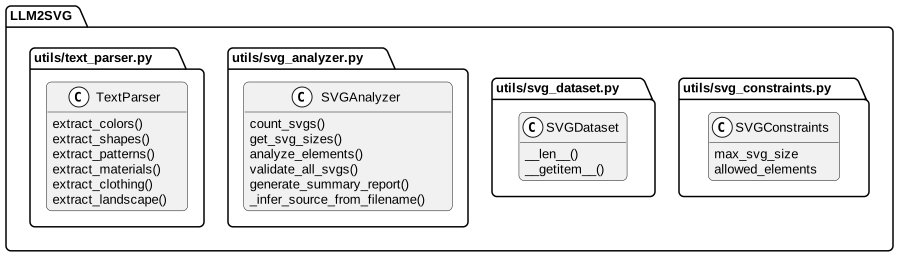
Selected declarations, fields and methods grouped by source file. No inheritance or call edges are inferred. Rendered with uml-mcp.
PlantUML source
@startuml
skinparam backgroundColor transparent
skinparam shadowing false
skinparam roundCorner 10
skinparam defaultFontName Arial
skinparam defaultFontSize 13
skinparam ArrowColor #4e6070
skinparam ArrowFontColor #3d4f5f
skinparam titleFontSize 14
skinparam actorBorderColor #006a62
skinparam actorBackgroundColor #e9f3f4
skinparam usecaseBorderColor #006a62
skinparam usecaseBackgroundColor #e9f3f4
skinparam componentBorderColor #006a62
skinparam componentBackgroundColor #e9f3f4
skinparam interfaceBorderColor #006a62
skinparam interfaceBackgroundColor #ffffff
skinparam nodeBorderColor #4e6070
skinparam nodeBackgroundColor #f4f8fb
skinparam databaseBorderColor #006a62
skinparam databaseBackgroundColor #ffffff
skinparam cloudBorderColor #4e6070
skinparam cloudBackgroundColor #f0f5fa
skinparam artifactBorderColor #006a62
skinparam artifactBackgroundColor #ffffff
skinparam rectangleBorderColor #b0c2d3
skinparam activityBorderColor #006a62
skinparam activityBackgroundColor #e9f3f4
skinparam partitionBorderColor #b0c2d3
skinparam stereotypeCBackgroundColor #ffffff
top to bottom direction
hide empty members
package "LLM2SVG" {
package "utils/text_parser.py" as F0 {
class "TextParser" as T0_0 {
  extract_colors()
  extract_shapes()
  extract_patterns()
  extract_materials()
  extract_clothing()
  extract_landscape()
}
}
package "utils/svg_analyzer.py" as F1 {
class "SVGAnalyzer" as T1_0 {
  count_svgs()
  get_svg_sizes()
  analyze_elements()
  validate_all_svgs()
  generate_summary_report()
  _infer_source_from_filename()
}
}
package "utils/svg_dataset.py" as F2 {
class "SVGDataset" as T2_0 {
  __len__()
  __getitem__()
}
}
package "utils/svg_constraints.py" as F3 {
class "SVGConstraints" as T3_0 {
  max_svg_size
  allowed_elements
}
}
}
@enduml
7.3. Private interface
These names are internal by the language’s conventions: a leading underscore, private, static or pub(crate).
- underscore helper
- 2
_load_descriptionsutils/data_loader.py:48_infer_source_from_filenameutils/svg_analyzer.py:155
7.4. Services
Service 1
SVGDataLoaderget_train_descriptions, get_test_descriptions, _load_descriptions and 4 more
7.5. Entities and data model 1
| Entity | Kind | First fields |
|---|---|---|
SVGConstraints | Dataclass | max_svg_size, allowed_elements |
7.6. Business logic
Once UI code and the services and entities above are set aside, these classes have the most methods.
TextParserCore source, 9 methodsextract_colors, extract_shapes, extract_patterns, extract_materials, extract_clothing, extract_landscapeSVGAnalyzerCore source, 7 methodscount_svgs, get_svg_sizes, analyze_elements, validate_all_svgs, generate_summary_report, _infer_source_from_filenameSVGDatasetCore source, 2 methods__len__, __getitem__
7.7. Database and persistence
7.8. CI/CD pipeline
No CI/CD pipeline in the repository. The code is built and run by hand, as described above.
7.9. Deployment
Mermaid Deployment diagram
flowchart LR
  repo[("GitHub repository")]
  local["Local machine"]
  repo -->|"clone and run"| local
The repository has no Dockerfile, Compose file or hosting configuration, so the code runs on the machine that clones it.
Nothing found for: Public interface, External integrations, Stack and dependencies, Monitoring, Security, Testing.
8. Types and file structure
5 declared types, with 5 in the base-relationship overview.
Type diagram
classDiagram
direction TB
class t61fa9a7ee491["SVGDataLoader"] {
  __init__()
  get_train_descriptions()
  get_test_descriptions()
  _load_descriptions()
}
class t30b1f34dc117["SVGAnalyzer"] {
  __init__()
  count_svgs()
  get_svg_sizes()
  analyze_elements()
}
class td0970883b50c["SVGConstraints"] {
  validate_svg()
}
class tae5163df548f["SVGDataset"] {
  __init__()
  __len__()
  __getitem__()
}
class t7bf894fe8630["TextParser"] {
  __init__()
  extract_colors()
  extract_shapes()
  extract_patterns()
}
class b4e2a6e40a537["Dataset"] {
  <<unresolved_base>>
}
b4e2a6e40a537 <|-- tae5163df548f
Unresolved bases remain labelled; full signatures are not reconstructed.
9. Reference
8 / 8 eligible files read (286 in the tree); 0 oversized, 0 failed reads and 0 syntax diagnostics.
What the scan covers
Known dependency/build folders, credential files and binaries are excluded. The scan covers READMEs, recognized manifests and parser-supported source files.
Linguist statistics cover the whole repository and may include other languages.
11. Files to read 3
12. Glossary
Repository
The versioned source files, configuration, and history of a project.
README
The repository’s entry document, usually covering its purpose and initial setup.
Dependency
A library, tool, or service that another component needs to build or run.
Container
An isolated process environment created from an image. Persistent data needs storage outside the container’s disposable filesystem.
Docker Compose
A configuration format and tool for starting related containers, networks, and volumes. Startup order alone does not guarantee service readiness.
Published port
A host port mapped to a service’s container port. Publishing a port can expose that service beyond its container network.
Build
The steps that turn source files and dependencies into a runnable program or distributable artifact.
Fork
A separate repository derived from another project. A change in a fork is not automatically a change in the upstream project.
13. References
- antoinebou12. (2026, November 5). LLM2SVG. [Software repository] github.com.
- antoinebou12. (2026, November 5). LLM2SVG: README. [Repository documentation] github.com.
- antoinebou12. (2026, November 5). utils/svg_analyzer.py. [Source file] github.com.
- antoinebou12. (2026, November 5). utils/data_loader.py. [Source file] github.com.
- antoinebou12. (2026, November 5). utils/svg_constraints.py. [Source file] github.com.
- Boucher, A. (2026, October 23). LLM2SVG: Dataset analysis before model claims. [Project article] antoineboucher.info.
Sources without a publication date show the date they were last checked, November 5, 2026. File links retain the inspected revision where available.