Table of contents
ComfyUI-UML: Diagram rendering inside a node graph
ComfyUI-UML adds diagram-oriented nodes to ComfyUI. Text enters a workflow, a rendering backend turns it into an image, and the workflow can retain the source and viewer links alongside that output.
- Languages
- 3Code breakdown
- Documented components
- 2Explore modules
- Source documents
- 3Read the instructions
Repository languagesPython 50.91%3
Shares calculated from GitHub Linguist bytes.
| Language | % | Bytes |
|---|---|---|
| Python | 130,995 | |
| JavaScript | 117,710 | |
| HTML | 8,584 |
1. Overview
1.1. Why it exists
Custom node implementation for ComfyUI node graphs integrating automated UML synthesis into image pipelines.
1.2. Best fit
Visual AI workflows combining diagram generation with image refinement.
2. Use cases
ComfyUI custom nodes that render Mermaid, PlantUML, Graphviz and other Kroki diagrams, optionally from LLM code.
- Render a diagram from code
- ComfyUI userKroki API
The UML Render node (nodes/uml_diagram.py) sends code to Kroki through nodes/kroki_client.py and returns png, svg, jpeg, pdf, txt or base64, checked against each type’s supported formats.
- Render Mermaid offline
- ComfyUI user
With backend set to local, web/js/render_mermaid.mjs uses beautiful-mermaid (after npm ci in web/js) to make SVG or PNG; Graphviz renders locally when the graphviz package is installed.
- Generate code with an LLM
- ComfyUI userLLM provider
UML Code Assistant (nodes/uml_llm.py), or LLM Prompt Engine followed by LLM Call, fills a template from prompts/ and calls Ollama, OpenAI, Anthropic or Gemini; the result feeds UML Render.
- Preview and share a link
- ComfyUI userKroki API
Diagram Viewer URL (nodes/uml_viewer_url.py) turns kroki_url into a viewer link and an iframe link (viewer.html?embed=1) and shows a live preview in the node.
- Save a diagram to ComfyUI
- ComfyUI user
The viewer’s Save button posts to /comfyui-uml/save, registered with the other routes in nodes/uml_routes.py.
2.1. Scenario: Draw a sequence diagram from a prompt with a local Ollama model
- Run comfy node install comfyui-uml (or clone into ComfyUI/custom_nodes and pip install -r requirements.txt), then restart ComfyUI.
- Load workflows/uml_llm_ollama.json in the ComfyUI canvas.
- Describe the diagram in UML Code Assistant, with provider ollama and a local model.
- Queue the prompt; UML Render sends the generated code to Kroki and outputs the image.
- Open the link from Diagram Viewer URL to zoom, copy the link or save the diagram to ComfyUI.
Files readREADME.mdnodes/__init__.pynodes/uml_diagram.pynodes/kroki_client.pynodes/uml_llm.pynodes/uml_llm_call.pynodes/uml_viewer_url.pynodes/uml_routes.pyworkflows/uml_llm_ollama.json
3. Getting started
These commands come from the repository documentation. They were not run during this review.
comfy node install comfyui-umlTasks declared in manifests
4. Repository references
Excerpts from the repository’s guides, in their original language. Links open the inspected source revision.
Prerequisites and first run
4.1. Installation
README.md
From Comfy Registry (recommended): Manual:
- Clone or copy this folder into ComfyUI/custom_nodes/.
- Install dependencies: pip install -r requirements.txt or uv sync.
- Optional — Local Mermaid (backend = local): install Node.js (LTS), then from this folder run cd web/js && npm ci (or npm install) so beautiful-mermaid is available for web/js/render_mermaid.mjs. PNG preview for SVG in the node: pip install cairosvg. Dynamic widget visibility: pip install comfy-dynamic-widgets (or extras from pyproject.toml).
4.2. Getting started
CONTRIBUTORS.md
- Clone the repository and open it in your editor.
- Install dev dependencies (pick one):
- uv sync –extra dev (recommended if you use uv)
- pip install -e “.[dev]”
- Run tests: uv run pytest or pytest (from the repo root).
- Lint/format: uv run ruff check . and uv run ruff format ., or install pre-commit and run pre-commit install. See docs/Testing.md for CI (pytest, comfy-test) and mock LLM behavior.
Configuration and usage
4.3. Usage
README.md
Operations and troubleshooting
4.4. Updating
README.md
4.5. Dependency updates
CONTRIBUTORS.md
- Dependabot opens PRs for Python (pyproject.toml / lockfile where applicable), npm under web/js, and GitHub Actions.
- Renovate is enabled with a dependency dashboard and focuses on updates that do not overlap Dependabot (for example, grouped Action bumps). If two bots open the same update, close one and keep the preferred PR.
Development and contributions
4.6. Testing
README.md
4.7. Development
README.md
To run linting and formatting on commit (JSON and Python):
- Install dev dependencies: pip install -e “.[dev]” or uv sync –extra dev.
- Install pre-commit hooks: pre-commit install. Pre-commit will format JSON (key order preserved) and run Ruff (lint + format) on Python. To run on all files: pre-commit run –all-files.
4.8. Contributing
README.md
4.9. Contributing to ComfyUI-UML
CONTRIBUTORS.md
5. Features and components 2
- Plugin registration
- The root __init__.py loads the nodes package under the unique name comfyui_uml_nodes. This avoids colliding with ComfyUI’s own nodes module. It exports the class mappings and the web directory used by the extension.
- Rendering and viewer
- The nodes directory separates diagram generation, Kroki communication and viewer URLs. Browser assets are exposed through WEB_DIRECTORY, while route registration adds the viewer’s save-to-output integration. Local rendering options and Kroki are distinct backends.
6. Architecture
Expand a component to follow its connections, or explore the full diagram.
Diagram text
Registered ComfyUI node
- From Diagram text
- To Local renderer
- To Kroki service
Local renderer
Kroki service
Image and viewer links
- From Local renderer
- From Kroki service
Mermaid Interactive diagram
System overview of the components and connections verified in the repository.

flowchart LR

subgraph group_workflow["ComfyUI Workflow"]
  node_workflow_nodes["ComfyUI Nodes<br/>[__init__.py]"]
  node_render_node["UML Render<br/>[uml_diagram.py]"]
  node_viewer_url_node["Diagram Viewer URL<br/>[uml_viewer_url.py]"]
  node_diagram_result["Diagram Result"]
end

subgraph group_rendering["Diagram Rendering"]
  node_diagram_defaults["Diagram Defaults<br/>[default_code.py]"]
  node_render_client["Render Backends<br/>[kroki_client.py]"]
  node_local_mermaid["Local Mermaid<br/>[render_mermaid.mjs]"]
end

subgraph group_generation["LLM Generation"]
  node_prompt_engine["Prompt Engine"]
  node_llm_call["LLM Call<br/>[uml_llm_call.py]"]
  node_code_assistant["LLM Code Assistant<br/>[uml_llm.py]"]
  node_llm_shared["LLM Providers<br/>[uml_llm_shared.py]"]
  node_prompt_templates["Prompt Templates"]
end

subgraph group_viewer["Viewer Experience"]
  node_frontend_extension["ComfyUI Extension<br/>[ComfyUI-UML.js]"]
  node_viewer_shell["Viewer Shell<br/>[viewer_shell.mjs]"]
  node_url_utils["Viewer URL Utilities<br/>[viewerUrlUtils.mjs]"]
  node_view_registry["View Registry<br/>[view_manifest.js]"]
  node_format_views["Format Views"]
end

node_user(("ComfyUI User"))
node_kroki["Kroki API"]

node_user -->|"configures"| node_workflow_nodes
node_workflow_nodes -->|"runs"| node_render_node
node_prompt_engine -->|"supplies prompt"| node_llm_call
node_llm_call -->|"calls provider"| node_llm_shared
node_code_assistant -->|"calls provider"| node_llm_shared
node_prompt_engine -->|"loads templates"| node_llm_shared
node_prompt_engine -.->|"loads presets"| node_prompt_templates
node_code_assistant -.->|"loads presets"| node_prompt_templates
node_code_assistant -->|"provides diagram code"| node_render_node
node_render_node -->|"uses defaults"| node_diagram_defaults
node_render_node -->|"requests rendering"| node_render_client
node_render_client -->|"posts diagram"| node_kroki
node_render_client -->|"runs local renderer"| node_local_mermaid
node_render_node -.->|"returns output"| node_diagram_result
node_render_node -->|"provides Kroki URL"| node_viewer_url_node
node_viewer_url_node -->|"opens preview"| node_frontend_extension
node_render_node -->|"opens viewer"| node_frontend_extension
node_frontend_extension -->|"builds viewer query"| node_url_utils
node_frontend_extension -.->|"opens viewer"| node_viewer_shell
node_viewer_shell -->|"infers format"| node_url_utils
node_viewer_shell -->|"selects view"| node_view_registry
node_view_registry -->|"loads format view"| node_format_views
node_viewer_shell -.->|"fetches diagram"| node_diagram_result


class node_workflow_nodes,node_render_node,node_viewer_url_node,node_diagram_result,node_user toneBlue
class node_diagram_defaults,node_render_client,node_local_mermaid toneAmber
class node_prompt_engine,node_llm_call,node_code_assistant,node_llm_shared,node_prompt_templates,node_kroki toneMint
class node_frontend_extension,node_viewer_shell,node_url_utils,node_view_registry,node_format_views toneRose
ComfyUI nodes that create diagram source, render through Kroki or local backends, and expose images, files and viewer links. Optional language-model nodes can generate the source before the rendering path.
- Components
- 19
- Connections
- 23
- Evidence-backed links
- 18/23
Text version of the diagram
- Diagram text → Registered ComfyUI node
- Registered ComfyUI node → Local renderer
- Registered ComfyUI node → Kroki service
- Local renderer → Image and viewer links
- Kroki service → Image and viewer links
Follow one path through the code
Start at NODE_CLASS_MAPPINGS, then follow a diagram node into its renderer. The loader uses an explicit module specification because ComfyUI may import the plugin directly from a file path.
7. Technical dossier
Built from the source at commit 1f14115 (49 files). Each item comes from a pattern match in the code, so open the linked file before relying on it.
7.1. Layers and modules
Folders are sorted into layers by name, from the user interface down to data access. Because the sorting uses names only, the diagram says nothing about calls between layers.
Mermaid Layered view
flowchart TB
  subgraph L_presentation["Presentation"]
    direction TB
    presentation_0["web/views<br/>8 files"]
    presentation_1["web<br/>5 files"]
    presentation_2["web/js<br/>3 files"]
  end
  subgraph L_interface["Entry points and API"]
    direction TB
    interface_0["nodes<br/>1 file"]
  end
  subgraph L_application["Application services"]
    direction TB
    application_0["nodes<br/>1 file"]
    application_1["scripts<br/>1 file"]
  end
  subgraph L_infrastructure["Data and infrastructure"]
    direction TB
    infrastructure_0["nodes<br/>1 file"]
  end
  subgraph L_core["Core source"]
    direction TB
    core_0["nodes<br/>7 files"]
    core_1["(root)<br/>3 files"]
  end
  subgraph L_tests["Tests"]
    direction TB
    tests_0["tests<br/>5 files"]
    tests_1["(root)<br/>1 file"]
    tests_2["web<br/>1 file"]
  end
  subgraph L_hosting["Build, CI and hosting"]
    direction TB
    hosting_0[".github<br/>10 files"]
  end
  L_presentation ~~~ L_interface
  L_interface ~~~ L_application
  L_application ~~~ L_infrastructure
  L_infrastructure ~~~ L_core
  L_core ~~~ L_tests
  L_core ~~~ L_hosting
7.2. C4 model
From system context to code declarations. Each level reflects the available source evidence.
UML 1 · System context
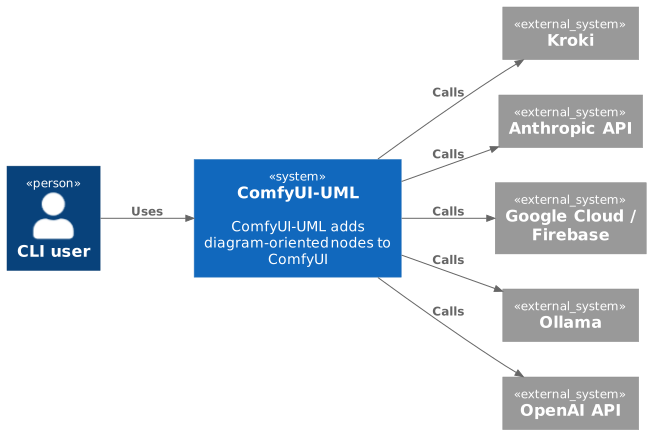
The widest C4 view: who uses the project and which outside systems and data stores it relies on. Rendered with uml-mcp.
PlantUML source
@startuml
!include <C4/C4_Context>
LAYOUT_LEFT_RIGHT()
Person(P_cli, "CLI user")
System(SYS, "ComfyUI-UML", "ComfyUI-UML adds diagram-oriented nodes to ComfyUI")
System_Ext(E0, "Kroki")
System_Ext(E1, "Anthropic API")
System_Ext(E2, "Google Cloud / Firebase")
System_Ext(E3, "Ollama")
System_Ext(E4, "OpenAI API")
Rel(P_cli, SYS, "Uses")
Rel(SYS, E0, "Calls")
Rel(SYS, E1, "Calls")
Rel(SYS, E2, "Calls")
Rel(SYS, E3, "Calls")
Rel(SYS, E4, "Calls")
@enduml
UML 2 · Containers
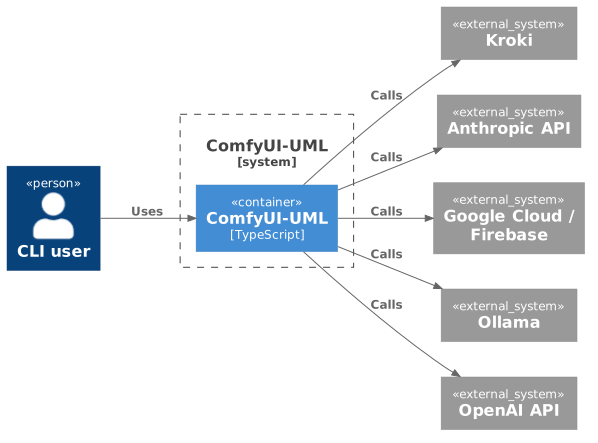
One level closer: the parts that run separately inside the project, their main language and how calls flow between them. Rendered with uml-mcp.
PlantUML source
@startuml
!include <C4/C4_Container>
LAYOUT_LEFT_RIGHT()
Person(P_cli, "CLI user")
System_Boundary(SYS, "ComfyUI-UML") {
  Container(APP, "ComfyUI-UML", "TypeScript")
}
System_Ext(E0, "Kroki")
System_Ext(E1, "Anthropic API")
System_Ext(E2, "Google Cloud / Firebase")
System_Ext(E3, "Ollama")
System_Ext(E4, "OpenAI API")
Rel(P_cli, APP, "Uses")
Rel(APP, E0, "Calls")
Rel(APP, E1, "Calls")
Rel(APP, E2, "Calls")
Rel(APP, E3, "Calls")
Rel(APP, E4, "Calls")
@enduml
UML 3 · Components and layers

Modules grouped by source-layer classification. Boundaries show organization, not runtime isolation or call relationships. Rendered with uml-mcp.
PlantUML source
@startuml
!include <C4/C4_Component>
LAYOUT_TOP_DOWN()
System_Boundary(SYS, "ComfyUI-UML") {
Boundary(L0, "Presentation", "layer") {
Component(M0_0, "web/js", "TypeScript, .mjs, JavaScript", "61 files")
Component(M0_1, "web/views", ".mjs, JavaScript", "8 files")
Component(M0_2, "web", "HTML, .mjs, JavaScript", "5 files")
}
Boundary(L1, "Entry points and API", "layer") {
Component(M1_0, "nodes", "Python", "1 files")
}
Boundary(L2, "Application services", "layer") {
Component(M2_0, "nodes", "Python", "1 files")
Component(M2_1, "scripts", "Python", "1 files")
}
Boundary(L3, "Domain and business rules", "layer") {
Component(M3_0, "web/js", "TypeScript, JavaScript", "15 files")
}
Boundary(L4, "Data and infrastructure", "layer") {
Component(M4_0, "nodes", "Python", "1 files")
}
Boundary(L5, "Core source", "layer") {
Component(M5_0, "nodes", "Python", "7 files")
Component(M5_1, "(root)", "Python", "3 files")
}
Boundary(L6, "Tests", "layer") {
Component(M6_0, "web", "TypeScript, .mjs", "23 files")
Component(M6_1, "tests", "Python", "5 files")
Component(M6_2, "(root)", "Python", "1 files")
}
Boundary(L7, "Build, CI and hosting", "layer") {
Component(M7_0, ".github", ".yml, .md", "10 files")
}
}
@enduml
UML 4 · Code
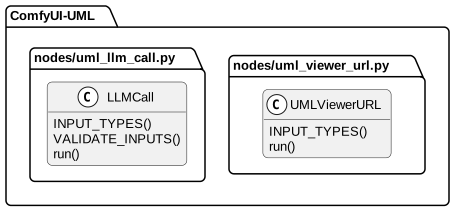
Selected declarations, fields and methods grouped by source file. No inheritance or call edges are inferred. Rendered with uml-mcp.
PlantUML source
@startuml
skinparam backgroundColor transparent
skinparam shadowing false
skinparam roundCorner 10
skinparam defaultFontName Arial
skinparam defaultFontSize 13
skinparam ArrowColor #4e6070
skinparam ArrowFontColor #3d4f5f
skinparam titleFontSize 14
skinparam actorBorderColor #006a62
skinparam actorBackgroundColor #e9f3f4
skinparam usecaseBorderColor #006a62
skinparam usecaseBackgroundColor #e9f3f4
skinparam componentBorderColor #006a62
skinparam componentBackgroundColor #e9f3f4
skinparam interfaceBorderColor #006a62
skinparam interfaceBackgroundColor #ffffff
skinparam nodeBorderColor #4e6070
skinparam nodeBackgroundColor #f4f8fb
skinparam databaseBorderColor #006a62
skinparam databaseBackgroundColor #ffffff
skinparam cloudBorderColor #4e6070
skinparam cloudBackgroundColor #f0f5fa
skinparam artifactBorderColor #006a62
skinparam artifactBackgroundColor #ffffff
skinparam rectangleBorderColor #b0c2d3
skinparam activityBorderColor #006a62
skinparam activityBackgroundColor #e9f3f4
skinparam partitionBorderColor #b0c2d3
skinparam stereotypeCBackgroundColor #ffffff
top to bottom direction
hide empty members
package "ComfyUI-UML" {
package "nodes/uml_llm_call.py" as F0 {
class "LLMCall" as T0_0 {
  INPUT_TYPES()
  VALIDATE_INPUTS()
  run()
}
}
package "nodes/uml_viewer_url.py" as F1 {
class "UMLViewerURL" as T1_0 {
  INPUT_TYPES()
  run()
}
}
}
@enduml
7.3. Data flow
The calls from the GitDiagram graph, in the order you meet them from the entry points. GitDiagram generates the graph with AI; the file paths it cites were checked against the repository tree.
Mermaid Sequence diagram
sequenceDiagram
  autonumber
  participant P0 as Prompt Engine
  participant P1 as LLM Call
  participant P2 as LLM Providers
  participant P3 as Prompt Templates
  participant P4 as LLM Code Assistant
  participant P5 as UML Render
  participant P6 as ComfyUI User
  participant P7 as ComfyUI Nodes
  participant P8 as Diagram Defaults
  participant P9 as Render Backends
  participant P10 as Diagram Result
  participant P11 as Diagram Viewer URL
  participant P12 as ComfyUI Extension
  participant P13 as Kroki API
  participant P14 as Local Mermaid
  P0->>P1: supplies prompt
  P0->>P2: loads templates
  P0--)P3: loads presets
  P4->>P2: calls provider
  P4--)P3: loads presets
  P4->>P5: provides diagram code
  P6->>P7: configures
  P1->>P2: calls provider
  P5->>P8: uses defaults
  P5->>P9: requests rendering
  P5--)P10: returns output
  P5->>P11: provides Kroki URL
  P5->>P12: opens viewer
  P7->>P5: runs
  P9->>P13: posts diagram
  P9->>P14: runs local renderer
Steps as text
- Prompt Engine to LLM Call supplies prompt
- Prompt Engine to LLM Providers loads templates
- Prompt Engine to Prompt Templates loads presets
- LLM Code Assistant to LLM Providers calls provider
- LLM Code Assistant to Prompt Templates loads presets
- LLM Code Assistant to UML Render provides diagram code
- ComfyUI User to ComfyUI Nodes configures
- LLM Call to LLM Providers calls provider
- UML Render to Diagram Defaults uses defaults
- UML Render to Render Backends requests rendering
- UML Render to Diagram Result returns output
- UML Render to Diagram Viewer URL provides Kroki URL
- UML Render to ComfyUI Extension opens viewer
- ComfyUI Nodes to UML Render runs
- Render Backends to Kroki API posts diagram
- Render Backends to Local Mermaid runs local renderer
- Diagram Viewer URL to ComfyUI Extension opens preview
- ComfyUI Extension to Viewer URL Utilities builds viewer query
- ComfyUI Extension to Viewer Shell opens viewer
- Viewer Shell to Viewer URL Utilities infers format
- Viewer Shell to View Registry selects view
- Viewer Shell to Diagram Result fetches diagram
- View Registry to Format Views loads format view
7.4. Public interface
Outside code can use everything listed here. The project also declares 8 public types.
UML Use cases
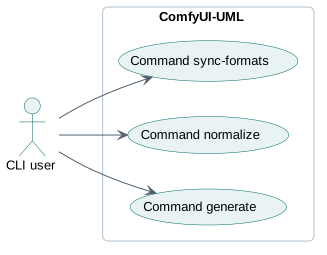
Each actor is a kind of caller, linked to what it can ask the project to do. Rendered with uml-mcp.
PlantUML source
@startuml
skinparam backgroundColor transparent
skinparam shadowing false
skinparam roundCorner 10
skinparam defaultFontName Arial
skinparam defaultFontSize 13
skinparam ArrowColor #4e6070
skinparam ArrowFontColor #3d4f5f
skinparam titleFontSize 14
skinparam actorBorderColor #006a62
skinparam actorBackgroundColor #e9f3f4
skinparam usecaseBorderColor #006a62
skinparam usecaseBackgroundColor #e9f3f4
skinparam componentBorderColor #006a62
skinparam componentBackgroundColor #e9f3f4
skinparam interfaceBorderColor #006a62
skinparam interfaceBackgroundColor #ffffff
skinparam nodeBorderColor #4e6070
skinparam nodeBackgroundColor #f4f8fb
skinparam databaseBorderColor #006a62
skinparam databaseBackgroundColor #ffffff
skinparam cloudBorderColor #4e6070
skinparam cloudBackgroundColor #f0f5fa
skinparam artifactBorderColor #006a62
skinparam artifactBackgroundColor #ffffff
skinparam rectangleBorderColor #b0c2d3
skinparam activityBorderColor #006a62
skinparam activityBackgroundColor #e9f3f4
skinparam partitionBorderColor #b0c2d3
skinparam stereotypeCBackgroundColor #ffffff
left to right direction
actor "CLI user" as A_cli
rectangle "ComfyUI-UML" {
  usecase "Command generate" as U0
  usecase "Command normalize" as U1
  usecase "Command sync-formats" as U2
}
A_cli --> U0
A_cli --> U1
A_cli --> U2
@enduml
Command line 5
Package exports (__all__)
NODE_CLASS_MAPPINGS NODE_DISPLAY_NAME_MAPPINGS WEB_DIRECTORY LLMCall LLMPromptEngine UMLLLMCodeGenerator UMLDiagram UMLViewerURL
7.5. Private interface
These names are internal by the language’s conventions: a leading underscore, private, static or pub(crate).
- underscore helper
- 63
_build_default_code_dictnodes/default_code.py:43_validate_type_formatnodes/kroki_client.py:95_decode_base64_responsenodes/kroki_client.py:146
7.6. Services
Service 1
LLMPromptEngineINPUT_TYPES, VALIDATE_INPUTS, run
7.7. Business logic
Once UI code and the services and entities above are set aside, these classes have the most methods.
LLMCallCore source, 3 methodsINPUT_TYPES, VALIDATE_INPUTS, runUMLViewerURLCore source, 2 methodsINPUT_TYPES, run
7.8. Database and persistence
7.9. External integrations
HTTP clients
Hosts named in the code
kroki.io3 filesnodes/uml_diagram.py:295api.anthropic.com1 filesnodes/uml_llm_shared.py:69api.openai.com1 filesnodes/uml_llm_shared.py:68generativelanguage.googleapis.com1 filesnodes/uml_llm_shared.py:71
7.10. Stack and dependencies
Python requirements.txt 2 runtime
Node.js web/js/package.json 2 runtime
External dependencies
9 declared packages (3 runtime, 6 development) in pyproject.toml, requirements.txt, web/js/package.json.
Package table 9
| Package | Version | Scope | Purpose | Registry |
|---|---|---|---|---|
kroki | >=0.1.6 | runtime | Access kroki from python | pypi.org |
cairosvg | >=2.7 | development | A Simple SVG Converter based on Cairo | pypi.org |
comfy-dynamic-widgets | >=0.1.6 | development | — | pypi.org |
pre-commit | >=3.6.0 | development | Linting and formatting | pypi.org |
pytest | >=7.0 | development | Testing | pypi.org |
pytest-asyncio | >=0.21 | development | Testing | pypi.org |
ruff | >=0.8.0 | development | Linting and formatting | pypi.org |
beautiful-mermaid | ^1.0.0 | runtime | Render Mermaid diagrams as beautiful SVGs or ASCII art. Ultra-fast, fully themeable, zero DOM dependencies. | npmjs.com |
simple-chromium-ai | ^0.2.1 | runtime | Simple type-safe wrapper for Chrome's AI Prompt API - trades flexibility for ease of use | npmjs.com |
7.11. CI/CD pipeline
7 GitHub Actions workflows, 7 jobs. Each box is a job; double-bordered boxes publish or deploy, and arrows follow needs.
Mermaid Pipeline flow
flowchart LR
  subgraph wf0["Act — comfy-test (Linux CPU)"]
    direction LR
    wf0_linux_test["linux-test (act)<br/>ubuntu-latest"]
  end
  subgraph wf1["CodeQL"]
    direction LR
    wf1_analyze["Analyze<br/>ubuntu-latest"]
  end
  subgraph wf2["Dependency review"]
    direction LR
    wf2_dependency_review["Dependency review<br/>ubuntu-latest"]
  end
  subgraph wf3["Publish to Comfy registry"]
    direction LR
    wf3_publish_node[["Publish Custom Node to registry<br/>ubuntu-latest"]]
  end
  subgraph wf4["Pytest"]
    direction LR
    wf4_pytest["pytest<br/>ubuntu-latest"]
  end
  subgraph wf5["Stale"]
    direction LR
    wf5_stale["Mark stale issues and PRs<br/>ubuntu-latest"]
  end
  t0(["manual run"])
  t1(["push · pull request"])
  t2(["pull request"])
  t3(["manual run · push"])
  t4(["pull request · push · manual run"])
  t5(["schedule · manual run"])
  t0 --> wf0_linux_test
  t1 --> wf1_analyze
  t2 --> wf2_dependency_review
  t3 --> wf3_publish_node
  t4 --> wf4_pytest
  t5 --> wf5_stale
| Workflow | Triggers | Jobs | Publishes to |
|---|---|---|---|
Act — comfy-test (Linux CPU).github/workflows/act-comfy-test-linux.yml | manual run |
| — |
CodeQL.github/workflows/codeql.yml | push, pull request |
| — |
Dependency review.github/workflows/dependency-review.yml | pull request |
| — |
Publish to Comfy registry.github/workflows/publish-node.yml | manual run, push |
| — |
Pytest.github/workflows/pytest.yml | pull request, push, manual run |
| — |
Stale.github/workflows/stale.yml | schedule, manual run |
| — |
Workflow Tests.github/workflows/workflow-tests.yml | pull request, push |
| — |
7.12. Deployment
Mermaid Deployment diagram
flowchart LR
  repo[("GitHub repository")]
  ci[["GitHub Actions<br/>7 workflows"]]
  pub_Container_registry[("Container registry")]
  repo -->|"push or pull request"| ci
  ci -->|"publishes"| pub_Container_registry
Where it runs
Published to
7.13. Monitoring
What the code logs, measures and exposes to tell whether it is working.
7.14. Security
Controls
Supply chain
- Dependabot updates
- Renovate updates
- Security policy
- CodeQL scanning
- Lockfile (pinned dependencies)
- pre-commit hooks
Environment variables 8
The page lists names without their values and underlines the ones that look like secrets.
BEAUTIFUL_MERMAID_ASCII_USE_ASCII BEAUTIFUL_MERMAID_THEME COMFYUI_UML_SKIP_COMFY_ENV BEAUTIFUL_MERMAID_OUTPUT COMFYUI_UML_PYTEST COMFY_UI_UML_MOCK_LLM GITHUB_ACTIONS OLLAMA_BASE_URL
7.15. Testing
- Test files
- 7
- Source files
- 30
- Test cases, about
- 49
- Unit tests
- 7
No measured coverage report in the analyzed sources.
Where the tests are
Continuous integration
UML CI pipeline
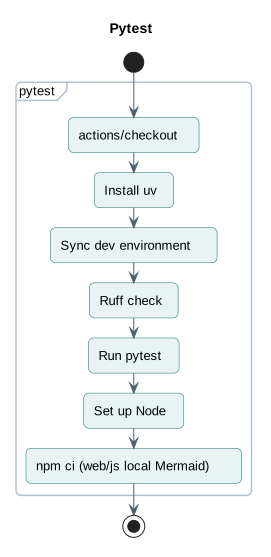
The main GitHub Actions workflow runs these steps. Jobs that run in parallel sit side by side. Rendered with uml-mcp.
PlantUML source
@startuml
skinparam backgroundColor transparent
skinparam shadowing false
skinparam roundCorner 10
skinparam defaultFontName Arial
skinparam defaultFontSize 13
skinparam ArrowColor #4e6070
skinparam ArrowFontColor #3d4f5f
skinparam titleFontSize 14
skinparam actorBorderColor #006a62
skinparam actorBackgroundColor #e9f3f4
skinparam usecaseBorderColor #006a62
skinparam usecaseBackgroundColor #e9f3f4
skinparam componentBorderColor #006a62
skinparam componentBackgroundColor #e9f3f4
skinparam interfaceBorderColor #006a62
skinparam interfaceBackgroundColor #ffffff
skinparam nodeBorderColor #4e6070
skinparam nodeBackgroundColor #f4f8fb
skinparam databaseBorderColor #006a62
skinparam databaseBackgroundColor #ffffff
skinparam cloudBorderColor #4e6070
skinparam cloudBackgroundColor #f0f5fa
skinparam artifactBorderColor #006a62
skinparam artifactBackgroundColor #ffffff
skinparam rectangleBorderColor #b0c2d3
skinparam activityBorderColor #006a62
skinparam activityBackgroundColor #e9f3f4
skinparam partitionBorderColor #b0c2d3
skinparam stereotypeCBackgroundColor #ffffff
title Pytest
start
partition "pytest" {
  :actions/checkout;
  :Install uv;
  :Sync dev environment;
  :Ruff check;
  :Run pytest;
  :Set up Node;
  :npm ci (web/js local Mermaid);
}
stop
@enduml
Nothing found for: Entities.
8. Types and file structure
11 declared types, with 11 in the base-relationship overview.
Type diagram
classDiagram
direction TB
class tb654476aede8["KrokiError"] {
}
class t50d2adfa6e30["UMLDiagram"] {
  INPUT_TYPES()
  VALIDATE_INPUTS()
  run()
}
class tf5d8a3add21d["UMLLLMCodeGenerator"] {
  INPUT_TYPES()
  VALIDATE_INPUTS()
  run()
}
class t54e8aa4c2ef3["LLMCall"] {
  INPUT_TYPES()
  VALIDATE_INPUTS()
  run()
}
class tad1d573d8063["LLMPromptEngine"] {
  INPUT_TYPES()
  VALIDATE_INPUTS()
  run()
}
class tf971647cbde8["UMLViewerURL"] {
  INPUT_TYPES()
  run()
}
class t12ed9326b7d8["Args"] {
}
class t00114166eb81["Args"] {
}
class tc2da0bee5d97["Obj"] {
}
class t0087e40115b2["Obj"] {
}
class ta16414e60e88["Obj"] {
  __str__()
}
class b60d1d89f176e["Exception"] {
  <<unresolved_base>>
}
b60d1d89f176e <|-- tb654476aede8
Unresolved bases remain labelled; full signatures are not reconstructed.
9. Reference
39 / 39 eligible files read (330 in the tree); 0 oversized, 0 failed reads and 0 syntax diagnostics.
What the scan covers
Known dependency/build folders, credential files and binaries are excluded. The scan covers READMEs, recognized manifests and parser-supported source files.
Linguist statistics cover the whole repository and may include other languages.
11. Files to read 3
12. Glossary
Repository
The versioned source files, configuration, and history of a project.
README
The repository’s entry document, usually covering its purpose and initial setup.
Dependency
A library, tool, or service that another component needs to build or run.
HTTP
A request-and-response protocol used by browsers and web services. A method, path, headers, and optional body describe a request.
Published port
A host port mapped to a service’s container port. Publishing a port can expose that service beyond its container network.
CLI
A text interface in which commands and arguments select operations. Exit codes let scripts detect success or failure.
Build
The steps that turn source files and dependencies into a runnable program or distributable artifact.
Continuous integration
Automated checks that run when source changes, such as building, testing, and linting. Passing checks cover only what those checks exercise.
Mermaid
A text-based diagram language. Nodes and connections describe a model; the diagram itself does not execute the project.
GPU
A processor designed for parallel workloads, including graphics rendering and many numerical operations.
Backend
An implementation behind a shared interface. Depending on context, it can mean a server-side service or a graphics, input, or storage implementation.
13. References
- antoinebou12. (2026, November 5). ComfyUI-UML. [Software repository] github.com.
- antoinebou12. (2026, November 5). ComfyUI-UML: README. [Repository documentation] github.com.
- antoinebou12. (2026, November 5). __init__.py. [Source file] github.com.
- antoinebou12. (2026, November 5). nodes/uml_diagram.py. [Source file] github.com.
- antoinebou12. (2026, November 5). nodes/kroki_client.py. [Source file] github.com.
- Boucher, A. (2026, October 20). ComfyUI-UML: diagrams as nodes, images and shareable source. [Project article] antoineboucher.info.
- Boucher, A. (2026, October 23). ComfyUI-UML: Diagram rendering inside a node graph. [Project article] antoineboucher.info.
Sources without a publication date show the date they were last checked, November 5, 2026. File links retain the inspected revision where available.