Table of contents
Artemis-N3DS: Streaming within a dual-screen client
Artemis-N3DS adapts Moonlight Embedded to the Nintendo 3DS family. It combines host discovery and pairing with a console-specific interface, input handling and video presentation. The New 3DS hardware path is a particular concern.
- Languages
- 6Code breakdown
- Documented components
- 2Explore modules
- Source documents
- 2Read the instructions
Repository languagesC++ 76.05%6
Shares calculated from GitHub Linguist bytes.
| Language | % | Bytes |
|---|---|---|
| C++ | 385,430 | |
| C | 79,616 | |
| CMake | 22,072 | |
| Makefile | 14,414 | |
| Shell | 3,221 | |
| Dockerfile | 2,051 |
1. Overview
1.1. Why it exists
Constrained systems engineering streaming 60fps video over 802.11n Wi-Fi to a dual-screen ARM11 device.
1.2. Best fit
Remote desktop and gaming on legacy Nintendo New 3DS hardware.
2. Use cases
Moonlight Embedded fork that streams games from a Sunshine PC to a New 3DS, with a bottom-screen helper UI.
- Install the CIA or 3DSX
- 3DS player
dist/INSTALL.md describes installing artemis.cia from the HOME Menu with FBI, or copying artemis.3dsx to sd:/3ds/artemis/ for the Homebrew Launcher; custom firmware is required.
- Pair with a host
- 3DS playerSunshine host PC
The player adds a host by LAN IP (host_discovery.cpp can also scan the network) and chooses pair; pair_host in src/n3ds_main.cpp shows a PIN to type into Sunshine and keeps a pair record.
- Stream a game or desktop
- 3DS playerSunshine host PC
Video plays on the top screen using the New 3DS hardware H.264 decoder; older 3DS models fall back to software decode at lower frame rates, per the README.
- Switch touch input modes
- 3DS playerSunshine host PC
The SELECT hub on the bottom screen switches between gamepad, mouse, keyboard, magnify and mirror handlers in src/input/touch/, plus Fit, Fill, Stretch and zoom display options.
- Save performance as CSV
- 3DS player
From the Session tab, the performance overlay shows stream telemetry; export_stream_benchmark_csv in src/stream_benchmark.cpp writes benchmark_<time>.csv to the SD card.
- Build with devkitPro
- Developer
docker build of the Dockerfile gives a devkitPro image; make inside it produces artemis.3dsx, artemis.cia and artemis.elf. A local devkitPro 3ds-dev setup with bannertool and makerom also works.
2.1. Scenario: Play a PC game on a New 3DS over Wi-Fi
- Copy artemis.cia to the SD card and install it in FBI with Install and delete CIA.
- Open Artemis, press A to add a host and enter the PC’s LAN IP address.
- Choose pair and type the PIN shown on the 3DS into Sunshine’s PIN page.
- Choose stream and pick an app; the video plays on the top screen.
- Press SELECT to switch to Mouse or Magnify, or open the performance overlay and save a CSV.
- Quit from the Session tab to end the stream.
Files readREADME.mddist/INSTALL.mddist/SD-DATA.mdsrc/n3ds_main.cppsrc/host_discovery.cppsrc/stream_benchmark.cppsrc/input/touch/stream_bottom_ui.cppDockerfile
3. Getting started
These commands come from the repository documentation. They were not run during this review.
makedocker build --network=host -t moonlight-n3ds .
docker run --rm -it -v .:/moonlight-N3DS -w /moonlight-N3DS moonlight-n3ds:latest
make4. Repository references
Excerpts from the repository’s guides, in their original language. Links open the inspected source revision.
Prerequisites and first run
4.1. Requirements
README.md
- New 3DS / New 3DS XL / New 2DS XL recommended (hardware H.264 decode)
- Original 3DS / 2DS works with software decode only — expect lower FPS
- PC running Sunshine (or compatible GameStream host) on the same network
- CFW + FBI for CIA install
4.2. Install
README.md
Configuration and usage
4.3. Configuration
README.md
Development and contributions
4.4. Contribute
README.md
- Fork the repo
- Make your changes
- Open a pull request
5. Features and components 2
- Control plane
- n3ds_main.cpp brings together host discovery, pair records, profiles and connection state. The selected host and application determine the stream request. Graphics lifecycle state is tracked separately from stream configuration.
- Media and interaction
- Audio, input and video live in separate src modules. Hardware capabilities influence the guidance shown to the user. The UI can return from a stream, while explicit system-close handling must unwind the application instead.
6. Architecture
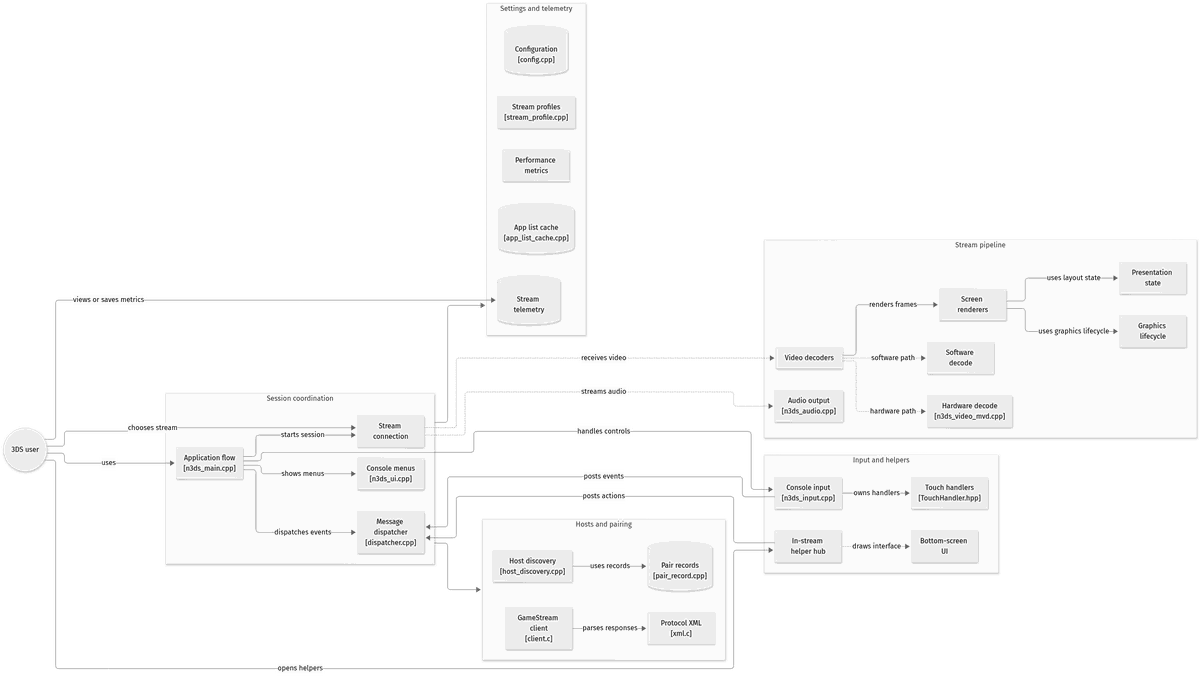
Expand a component to follow its connections, or explore the full diagram.
Host discovery and pairing
Selected app and profile
GameStream connection
Video and audio backends
3DS screens and controls
Mermaid Interactive diagram
System overview of the components and connections verified in the repository.
flowchart LR
node_user(("3DS user"))

subgraph group_host["Hosts and pairing"]
  node_discovery["Host discovery<br/>[host_discovery.cpp]"]
  node_pairing[("Pair records<br/>[pair_record.cpp]")]
  node_gamestream["GameStream client<br/>[client.c]"]
  node_xml["Protocol XML<br/>[xml.c]"]
end

subgraph group_session["Session coordination"]
  node_main["Application flow<br/>[n3ds_main.cpp]"]
  node_ui["Console menus<br/>[n3ds_ui.cpp]"]
  node_connection["Stream connection"]
  node_dispatcher["Message dispatcher<br/>[dispatcher.cpp]"]
end

subgraph group_stream["Stream pipeline"]
  node_presentation["Presentation state"]
  node_decoder["Video decoders"]
  node_mvd["Hardware decode<br/>[n3ds_video_mvd.cpp]"]
  node_software["Software decode"]
  node_renderer["Screen renderers"]
  node_graphics["Graphics lifecycle"]
  node_audio["Audio output<br/>[n3ds_audio.cpp]"]
end

subgraph group_interaction["Input and helpers"]
  node_input["Console input<br/>[n3ds_input.cpp]"]
  node_touch["Touch handlers<br/>[TouchHandler.hpp]"]
  node_menuhub["In-stream helper hub"]
  node_bottomui["Bottom-screen UI"]
end

subgraph group_state["Settings and telemetry"]
  node_config[("Configuration<br/>[config.cpp]")]
  node_appcache[("App list cache<br/>[app_list_cache.cpp]")]
  node_profiles["Stream profiles<br/>[stream_profile.cpp]"]
  node_telemetry[("Stream telemetry")]
  node_benchmark["Performance metrics"]
end

node_user -->|"uses"| node_main
node_gamestream -->|"parses responses"| node_xml
node_discovery -->|"uses records"| node_pairing
node_main -->|"shows menus"| node_ui
node_main -->|"starts session"| node_connection
node_main -->|"handles controls"| node_input
node_input -->|"posts events"| node_dispatcher
node_input -->|"owns handlers"| node_touch
node_main -->|"dispatches events"| node_dispatcher
node_user -->|"opens helpers"| node_menuhub
node_menuhub -->|"posts actions"| node_dispatcher
node_menuhub -.->|"draws interface"| node_bottomui
node_user -->|"chooses stream"| node_connection
node_connection -.->|"receives video"| node_decoder
node_decoder -.->|"hardware path"| node_mvd
node_decoder -.->|"software path"| node_software
node_decoder -->|"renders frames"| node_renderer
node_renderer -->|"uses layout state"| node_presentation
node_renderer -->|"uses graphics lifecycle"| node_graphics
node_connection -.->|"streams audio"| node_audio
node_user -->|"views or saves metrics"| node_telemetry
group_session --> group_host
group_session --> group_state
class node_discovery,node_pairing,node_gamestream,node_xml,node_user toneBlue
class node_main,node_ui,node_connection,node_dispatcher toneAmber
class node_presentation,node_decoder,node_mvd,node_software,node_renderer,node_graphics,node_audio toneMint
class node_input,node_touch,node_menuhub,node_bottomui toneRose
class node_config,node_appcache,node_profiles,node_telemetry,node_benchmark toneIndigo
A Nintendo 3DS GameStream client. Users discover or add a Sunshine-compatible host, pair the console, choose an application and start streaming through session, video, rendering, input and bottom-screen subsystems.
- Components
- 25
- Connections
- 29
- Evidence-backed links
- 23/29
Text version of the diagram
The diagram merges parallel links between groups, so it shows 23 of 29. Full list:
- 3DS user → Application flow (uses)
- Application flow → Host discovery (finds hosts)
- Application flow → Pair records (pairs host)
- Application flow → GameStream client (manages host)
- GameStream client → Protocol XML (parses responses)
- Host discovery → Pair records (uses records)
- Application flow → Console menus (shows menus)
- Application flow → App list cache (lists apps)
- Application flow → Stream connection (starts session)
- Application flow → Configuration (loads settings)
- Application flow → Stream profiles (selects profile)
- Application flow → Console input (handles controls)
- Console input → Message dispatcher (posts events)
- Console input → Touch handlers (owns handlers)
- Application flow → Message dispatcher (dispatches events)
- 3DS user → In-stream helper hub (opens helpers)
- In-stream helper hub → Message dispatcher (posts actions)
- In-stream helper hub → Bottom-screen UI (draws interface)
- 3DS user → Stream connection (chooses stream)
- Stream connection → Video decoders (receives video)
- Video decoders → Hardware decode (hardware path)
- Video decoders → Software decode (software path)
- Video decoders → Screen renderers (renders frames)
- Screen renderers → Presentation state (uses layout state)
- Screen renderers → Graphics lifecycle (uses graphics lifecycle)
- Stream connection → Audio output (streams audio)
- 3DS user → Stream telemetry (views or saves metrics)
- 3DS user → Performance metrics (views performance)
- Application flow → Stream telemetry (uses telemetry store)
Follow one path through the code
Follow SelectedHost and stream-profile selection before entering the media path. System close and a normal return to the menu are different transitions; the explicit close flag exists to keep those paths apart.
7. Technical dossier
Built from the source at commit c5eb020 (104 files). Each item comes from a pattern match in the code, so open the linked file before relying on it.
7.1. Layers and modules
Folders are sorted into layers by name, from the user interface down to data access. Because the sorting uses names only, the diagram says nothing about calls between layers.
Mermaid Layered view
flowchart TB
  subgraph L_interface["Entry points and API"]
    direction TB
    interface_0["src<br/>1 file"]
  end
  subgraph L_domain["Domain and business rules"]
    direction TB
    domain_0["input/touch<br/>2 files"]
  end
  subgraph L_infrastructure["Data and infrastructure"]
    direction TB
    infrastructure_0["libgamestream<br/>2 files"]
    infrastructure_1["src<br/>2 files"]
    infrastructure_2["third_party/ilclient<br/>2 files"]
  end
  subgraph L_core["Core source"]
    direction TB
    core_0["src<br/>26 files"]
    core_1["third_party/libuuid<br/>17 files"]
    core_2["input/touch<br/>16 files"]
    core_3["system<br/>12 files"]
    core_more["+9"]
  end
  subgraph L_tests["Tests"]
    direction TB
    tests_0["tests<br/>1 file"]
  end
  subgraph L_hosting["Build, CI and hosting"]
    direction TB
    hosting_0[".github<br/>7 files"]
    hosting_1["(root)<br/>3 files"]
    hosting_2["libgamestream<br/>1 file"]
  end
  L_interface ~~~ L_domain
  L_domain ~~~ L_infrastructure
  L_infrastructure ~~~ L_core
  L_core ~~~ L_tests
  L_core ~~~ L_hosting
| Module | Layer | Files | Types | Extensions |
|---|---|---|---|---|
src | Core source | 29 | 22 | .hpp .cpp .c |
input/touch | Core source | 18 | 23 | .cpp .hpp |
third_party/libuuid | Core source | 17 | 0 | .c .h |
libgamestream | Core source | 13 | 8 | .h .c |
system | Core source | 12 | 10 | .hpp .cpp .c |
video/renderer | Core source | 9 | 9 | .cpp .hpp |
video | Core source | 8 | 4 | .cpp .hpp .c |
third_party/h264bitstream | Core source | 6 | 0 | .h .c |
3ds | Core source | 3 | 0 | .sh |
third_party/ilclient | Data and infrastructure | 3 | 0 | .c .h |
audio | Core source | 2 | 0 | .h .cpp |
input | Core source | 2 | 1 | .cpp .hpp |
third_party/libcec | Core source | 1 | 0 | .h |
7.2. C4 model
From system context to code declarations. Each level reflects the available source evidence.
UML 1 · System context
The widest C4 view: who uses the project and which outside systems and data stores it relies on. Rendered with uml-mcp.
PlantUML source
@startuml
!include <C4/C4_Context>
LAYOUT_LEFT_RIGHT()
System(SYS, "Artemis-N3DS", "Artemis-N3DS adapts Moonlight Embedded to the Nintendo 3DS family")
@enduml
UML 2 · Containers
One level closer: the parts that run separately inside the project, their main language and how calls flow between them. Rendered with uml-mcp.
PlantUML source
@startuml
!include <C4/C4_Container>
LAYOUT_LEFT_RIGHT()
System_Boundary(SYS, "Artemis-N3DS") {
  Container(APP, "Artemis-N3DS", "C++")
}
@enduml
UML 3 · Components and layers
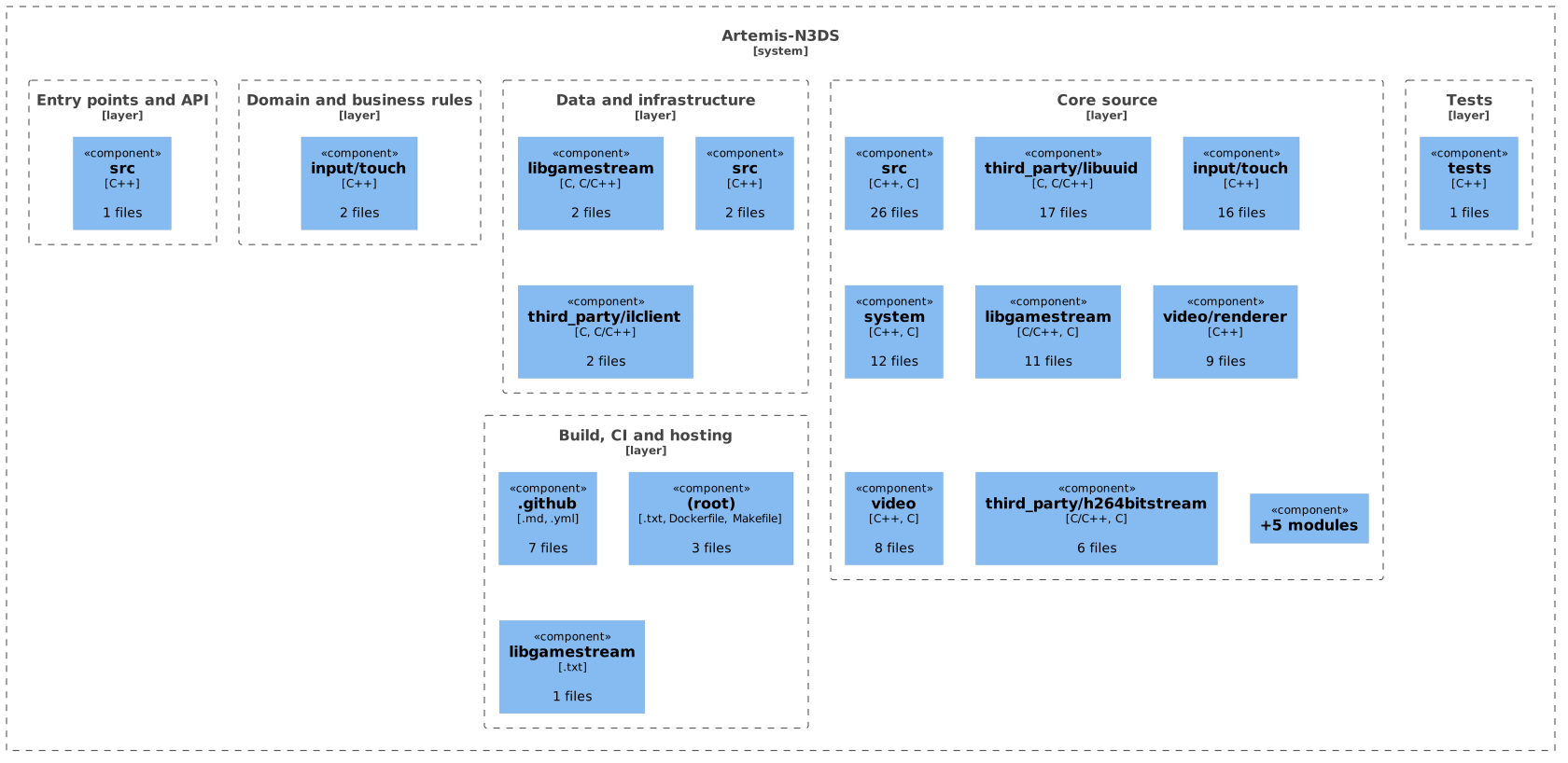
Modules grouped by source-layer classification. Boundaries show organization, not runtime isolation or call relationships. Rendered with uml-mcp.
PlantUML source
@startuml
!include <C4/C4_Component>
LAYOUT_TOP_DOWN()
System_Boundary(SYS, "Artemis-N3DS") {
Boundary(L0, "Entry points and API", "layer") {
Component(M0_0, "src", "C++", "1 files")
}
Boundary(L1, "Domain and business rules", "layer") {
Component(M1_0, "input/touch", "C++", "2 files")
}
Boundary(L2, "Data and infrastructure", "layer") {
Component(M2_0, "libgamestream", "C, C/C++", "2 files")
Component(M2_1, "src", "C++", "2 files")
Component(M2_2, "third_party/ilclient", "C, C/C++", "2 files")
}
Boundary(L3, "Core source", "layer") {
Component(M3_0, "src", "C++, C", "26 files")
Component(M3_1, "third_party/libuuid", "C, C/C++", "17 files")
Component(M3_2, "input/touch", "C++", "16 files")
Component(M3_3, "system", "C++, C", "12 files")
Component(M3_4, "libgamestream", "C/C++, C", "11 files")
Component(M3_5, "video/renderer", "C++", "9 files")
Component(M3_6, "video", "C++, C", "8 files")
Component(M3_7, "third_party/h264bitstream", "C/C++, C", "6 files")
Component(M3_more, "+5 modules", "", "")
}
Boundary(L4, "Tests", "layer") {
Component(M4_0, "tests", "C++", "1 files")
}
Boundary(L5, "Build, CI and hosting", "layer") {
Component(M5_0, ".github", ".md, .yml", "7 files")
Component(M5_1, "(root)", ".txt, Dockerfile, Makefile", "3 files")
Component(M5_2, "libgamestream", ".txt", "1 files")
}
}
@enduml
UML 4 · Code

Selected declarations, fields and methods grouped by source file. No inheritance or call edges are inferred. Rendered with uml-mcp.
PlantUML source
@startuml
skinparam backgroundColor transparent
skinparam shadowing false
skinparam roundCorner 10
skinparam defaultFontName Arial
skinparam defaultFontSize 13
skinparam ArrowColor #4e6070
skinparam ArrowFontColor #3d4f5f
skinparam titleFontSize 14
skinparam actorBorderColor #006a62
skinparam actorBackgroundColor #e9f3f4
skinparam usecaseBorderColor #006a62
skinparam usecaseBackgroundColor #e9f3f4
skinparam componentBorderColor #006a62
skinparam componentBackgroundColor #e9f3f4
skinparam interfaceBorderColor #006a62
skinparam interfaceBackgroundColor #ffffff
skinparam nodeBorderColor #4e6070
skinparam nodeBackgroundColor #f4f8fb
skinparam databaseBorderColor #006a62
skinparam databaseBackgroundColor #ffffff
skinparam cloudBorderColor #4e6070
skinparam cloudBackgroundColor #f0f5fa
skinparam artifactBorderColor #006a62
skinparam artifactBackgroundColor #ffffff
skinparam rectangleBorderColor #b0c2d3
skinparam activityBorderColor #006a62
skinparam activityBackgroundColor #e9f3f4
skinparam partitionBorderColor #b0c2d3
skinparam stereotypeCBackgroundColor #ffffff
top to bottom direction
hide empty members
package "Artemis-N3DS" {
package "src/video/renderer/N3dsRenderer.hpp" as F0 {
class "N3dsRendererBase" as T0_0 {
  draw_perf_counters()
  write_px_to_framebuffer_gpu()
  ensure_3d_enabled()
  ensure_3d_disabled()
  write24()
}
class "N3dsRendererDualScreenMagnify" as T0_1 {
  write_px_to_framebuffer()
  set_perf_decode_ticks()
  set_crop_region()
  accept()
}
class "N3dsRendererNormal" as T0_2 {
  write_px_to_framebuffer()
  set_perf_decode_ticks()
  set_bottom_screen()
}
class "N3dsRendererBottom" as T0_3 {
  write_px_to_framebuffer()
  write_px_to_framebuffer_raw()
}
class "N3dsRendererDualScreenMirror" as T0_4 {
  write_px_to_framebuffer()
  set_perf_decode_ticks()
}
}
package "src/input/touch/stream_bottom_ui.hpp" as F1 {
class "BottomCanvas" as T1_0 {
  ready()
  put()
  fill()
  clear()
  round_fill()
  glyph()
}
}
package "src/system/n3ds_connection.hpp" as F2 {
class "N3dsConnectionListener" as T2_0 {
  accept()
  create_instance()
  get_instance()
  destroy_instance()
  connection_terminated()
  connection_log_message()
}
}
package "src/input/n3ds_input.hpp" as F3 {
class "N3dsInput" as T3_0 {
  accept()
  n3dsinput_handle_event()
  force_touchscreen_menu()
  _add_gamepad()
  _remove_gamepad()
  _n3ds_to_li_buttons()
}
}
package "src/input/touch/TouchHandler.hpp" as F4 {
class "TouchHandlerBase" as T4_0 {
  handle_touch_down()
  handle_touch_up()
  handle_touch_hold()
  captures_gamepad_input()
  handle_navigation()
  _handle_touch_down()
}
class "KeyInfo" as T4_1 {
  min_x
  max_x
  min_y
  max_y
  key_px_size
  std
}
}
package "src/system/dispatcher.hpp" as F5 {
class "MessageDispatcher" as T5_0 {
  get_instance()
  subscribe()
  unsubscribe()
  post_immediate()
  post()
  dispatch_all()
}
}
package "src/stream_profile.hpp" as F6 {
class "StreamProfilePreset" as T6_0 {
  name
  width
  height
  fps
  bitrate_kbps
  presentation_mode
  _CONFIGURATION
  PCONFIGURATION
}
}
package "src/config.hpp" as F7 {
class "_CONFIGURATION" as T7_0 {
  stream
  app
  action
  address
  mapping
  platform
  audio_device
  config_file
}
}
package "libgamestream/client.h" as F8 {
class "_SERVER_DATA" as T8_0 {
  gpuType
  paired
  unsupported
  isNvidiaSoftware
  currentGame
  serverMajorVersion
  gsVersion
  modes
}
}
package "libgamestream/xml.c" as F9 {
class "xml_query" as T9_0 {
  memory
  size
  start
  data
  head
  tail
  current
}
class "xml_applist_query" as T9_1 {
  head
  tail
  current
  memory
  size
  field
}
}
package "libgamestream/xml.h" as F10 {
class "_APP_LIST" as T10_0 {
  name
  id
  next
  height
  width
  refresh
}
class "_DISPLAY_MODE" as T10_1 {
  height
  width
  refresh
  next
}
}
package "src/n3ds_ui.cpp" as F11 {
class "VisibleAction" as T11_0 {
  kind
  key
  std
  primary
}
class "AnalogNavState" as T11_1 {
  std
  value
}
}
package "src/input/touch/keycode_map.hpp" as F12 {
class "key_boundary" as T12_0 {
  max_x
  key_idx
  max_y
  std
}
}
package "src/input/touch/MenuTouchHandler.cpp" as F13 {
class "MenuTile" as T13_0 {
  label
  kind
  PresentationMode
}
}
package "src/input/touch/ShortcutsTouchHandler.cpp" as F14 {
class "ShortcutDef" as T14_0 {
  label
  key
  modifiers
}
}
package "libgamestream/mkcert.h" as F15 {
class "_CERT_KEY_PAIR" as T15_0 {
  x509
  pkey
  p12
}
}
}
@enduml
7.3. Data flow
The calls from the GitDiagram graph, in the order you meet them from the entry points. GitDiagram generates the graph with AI; the file paths it cites were checked against the repository tree.
Mermaid Sequence diagram
sequenceDiagram
  autonumber
  participant P0 as 3DS user
  participant P1 as Application flow
  participant P2 as In-stream helper hub
  participant P3 as Stream connection
  participant P4 as Stream telemetry
  participant P5 as Performance metrics
  participant P6 as Host discovery
  participant P7 as Pair records
  participant P8 as GameStream client
  participant P9 as Console menus
  participant P10 as App list cache
  participant P11 as Configuration
  participant P12 as Stream profiles
  participant P13 as Console input
  participant P14 as Message dispatcher
  P0->>P1: uses
  P0->>P2: opens helpers
  P0->>P3: chooses stream
  P0->>P4: views or saves metrics
  P0->>P5: views performance
  P1->>P6: finds hosts
  P1->>P7: pairs host
  P1--)P8: manages host
  P1->>P9: shows menus
  P1->>P10: lists apps
  P1->>P3: starts session
  P1->>P11: loads settings
  P1->>P12: selects profile
  P1->>P13: handles controls
  P1->>P14: dispatches events
  P1->>P4: uses telemetry store
Steps as text (+5)
- 3DS user to Application flow uses
- 3DS user to In-stream helper hub opens helpers
- 3DS user to Stream connection chooses stream
- 3DS user to Stream telemetry views or saves metrics
- 3DS user to Performance metrics views performance
- Application flow to Host discovery finds hosts
- Application flow to Pair records pairs host
- Application flow to GameStream client manages host
- Application flow to Console menus shows menus
- Application flow to App list cache lists apps
- Application flow to Stream connection starts session
- Application flow to Configuration loads settings
- Application flow to Stream profiles selects profile
- Application flow to Console input handles controls
- Application flow to Message dispatcher dispatches events
- Application flow to Stream telemetry uses telemetry store
- In-stream helper hub to Message dispatcher posts actions
- In-stream helper hub to Bottom-screen UI draws interface
- Stream connection to Video decoders receives video
- Stream connection to Audio output streams audio
- Host discovery to Pair records uses records
- GameStream client to Protocol XML parses responses
- Console input to Message dispatcher posts events
- Console input to Touch handlers owns handlers
7.4. Private interface
These names are internal by the language’s conventions: a leading underscore, private, static or pub(crate).
- static (file-local) function
- 59
- anonymous namespace
- 25
mkdirtreelibgamestream/client.c:65load_unique_idlibgamestream/client.c:94load_certlibgamestream/client.c:116namespace { }src/app_list_cache.cpp:10namespace { }src/config.cpp:41namespace { }src/graphics_lifecycle.cpp:7
7.5. Services
Handler 10
KeyboardTouchHandler_handle_touch_down, _handle_touch_up, _handle_touch_hold and 8 moreMenuTouchHandlercaptures_gamepad_input, handle_navigation, _handle_touch_down and 7 moreShortcutsTouchHandlercaptures_gamepad_input, handle_navigation, _handle_touch_down and 6 morePerformanceTouchHandlercaptures_gamepad_input, handle_navigation, _handle_touch_down and 5 moreMagnifyTouchHandlercaptures_gamepad_input, handle_navigation, _handle_touch_down and 4 moreGamepadTouchHandler_handle_touch_down, _handle_touch_up, _handle_touch_hold and 1 moreDebugTouchHandler_handle_touch_down, _handle_touch_up, _handle_touch_holdMouseTouchHandler_handle_touch_down, _handle_touch_up, _handle_touch_hold
Service 1
IN3dsRendererwrite_px_to_framebuffer, set_perf_decode_ticks
7.6. Entities and data model 37
Mermaid Entity class diagram
classDiagram
  direction LR
  class E0["StreamProfilePreset"] {
    +char name
    +int width
    +int height
    +int fps
    +int bitrate_kbps
    +PresentationMode presentation_mode
  }
  class E1["_CONFIGURATION"] {
    +STREAM_CONFIGURATION stream
    +char app
    +char action
    +char address
    +char mapping
    +char platform
  }
  class E2["_SERVER_DATA"] {
    +char gpuType
    +bool paired
    +bool unsupported
    +bool isNvidiaSoftware
    +int currentGame
    +int serverMajorVersion
  }
  class E3["xml_query"] {
    +char memory
    +size_t size
    +int start
    +void data
    +PAPP_LIST head
    +PAPP_LIST tail
  }
  class E4["KeyInfo"] {
    +int min_x
    +int max_x
    +int min_y
    +int max_y
    +int key_px_size
    +:map std
  }
  class E5["_APP_LIST"] {
    +char name
    +int id
    +struct next
    +unsigned height
    +unsigned width
    +unsigned refresh
  }
  class E6["xml_applist_query"] {
    +PAPP_LIST head
    +PAPP_LIST tail
    +PAPP_LIST current
    +char memory
    +size_t size
    +enum field
  }
  class E7["VisibleAction"] {
    +ActionKind kind
    +char key
    +:vector std
    +bool primary
  }
  class E8["_DISPLAY_MODE"] {
    +unsigned height
    +unsigned width
    +unsigned refresh
    +struct next
  }
  class E9["key_boundary"] {
    +u16 max_x
    +int key_idx
    +u16 max_y
    +:vector std
  }
  E5 --> E8 : next
An arrow links a field to the entity its type names.
| Entity | Kind | First fields |
|---|---|---|
StreamProfilePreset | Data struct | name, width, height, fps, bitrate_kbps, presentation_mode, _CONFIGURATION, PCONFIGURATION |
_CONFIGURATION | Data struct | stream, app, action, address, mapping, platform, audio_device, config_file |
_SERVER_DATA | Data struct | gpuType, paired, unsupported, isNvidiaSoftware, currentGame, serverMajorVersion, gsVersion, modes |
xml_query | Data struct | memory, size, start, data, head, tail, current |
KeyInfo | Data struct | min_x, max_x, min_y, max_y, key_px_size, std |
_APP_LIST | Data struct | name, id, next, height, width, refresh |
xml_applist_query | Data struct | head, tail, current, memory, size, field |
VisibleAction | Data struct | kind, key, std, primary |
Show 6 more entities
_DISPLAY_MODE | Data struct | height, width, refresh, next |
|---|---|---|
key_boundary | Data struct | max_x, key_idx, max_y, std |
MenuTile | Data struct | label, kind, PresentationMode |
ShortcutDef | Data struct | label, key, modifiers |
_CERT_KEY_PAIR | Data struct | x509, pkey, p12 |
AnalogNavState | Data struct | std, value |
7.7. Business logic
Once UI code and the services and entities above are set aside, these classes have the most methods.
N3dsRendererBaseCore source, 5 methodsdraw_perf_counters, write_px_to_framebuffer_gpu, ensure_3d_enabled, ensure_3d_disabled, write24BottomCanvasCore source, 10 methodsready, put, fill, clear, round_fill, glyphN3dsConnectionListenerCore source, 10 methodsaccept, create_instance, get_instance, destroy_instance, connection_terminated, connection_log_messageN3dsRendererDualScreenMagnifyCore source, 4 methodswrite_px_to_framebuffer, set_perf_decode_ticks, set_crop_region, acceptN3dsInputCore source, 9 methodsaccept, n3dsinput_handle_event, force_touchscreen_menu, _add_gamepad, _remove_gamepad, _n3ds_to_li_buttonsN3dsRendererNormalCore source, 3 methodswrite_px_to_framebuffer, set_perf_decode_ticks, set_bottom_screenN3dsRendererBottomCore source, 2 methodswrite_px_to_framebuffer, write_px_to_framebuffer_rawN3dsRendererDualScreenMirrorCore source, 2 methodswrite_px_to_framebuffer, set_perf_decode_ticksTouchHandlerBaseCore source, 8 methodshandle_touch_down, handle_touch_up, handle_touch_hold, captures_gamepad_input, handle_navigation, _handle_touch_downMessageDispatcherCore source, 7 methodsget_instance, subscribe, unsubscribe, post_immediate, post, dispatch_all
7.8. External integrations
HTTP clients
7.9. Stack and dependencies
C/C++ (CMake) libgamestream/CMakeLists.txt 5 runtime
External dependencies
13 declared packages (13 runtime, 0 development) in CMakeLists.txt, Makefile, libgamestream/CMakeLists.txt.
Package table 13
| Package | Version | Scope | Purpose | Registry |
|---|---|---|---|---|
ALSA | — | runtime | — | C/C++ (CMake) |
Opus | — | runtime | — | C/C++ (CMake) |
Broadcom | — | runtime | — | C/C++ (CMake) |
Freescale | — | runtime | — | C/C++ (CMake) |
Amlogic | — | runtime | — | C/C++ (CMake) |
Rockchip | — | runtime | — | C/C++ (CMake) |
PkgConfig | — | runtime | — | C/C++ (CMake) |
MMAL | — | runtime | — | C/C++ (CMake) |
LibUUID | — | runtime | — | C/C++ (CMake) |
Threads | — | runtime | — | C/C++ (CMake) |
CURL | — | runtime | — | C/C++ (CMake) |
OpenSSL | — | runtime | — | C/C++ (CMake) |
EXPAT | — | runtime | — | C/C++ (CMake) |
7.10. CI/CD pipeline
2 GitHub Actions workflows, 3 jobs. Each box is a job; double-bordered boxes publish or deploy, and arrows follow needs.
Mermaid Pipeline flow
flowchart LR
  subgraph wf0["CI"]
    direction LR
    wf0_foundation_tests["Foundation tests<br/>ubuntu-latest"]
    wf0_build_cia[["Build CIA and 3DSX<br/>ubuntu-latest"]]
  end
  subgraph wf1["Release"]
    direction LR
    wf1_release[["Build and publish release<br/>ubuntu-latest"]]
  end
  t0(["manual run · push · pull request"])
  t1(["manual run · push"])
  d0[("GitHub Releases")]
  t0 --> wf0_foundation_tests
  wf0_foundation_tests --> wf0_build_cia
  t1 --> wf1_release
  wf1_release -.-> d0
| Workflow | Triggers | Jobs | Publishes to |
|---|---|---|---|
CI.github/workflows/build-cia.yml | manual run, push, pull request |
| — |
Release.github/workflows/release.yml | manual run, push |
| GitHub Releases |
7.11. Deployment
Mermaid Deployment diagram
flowchart LR
  repo[("GitHub repository")]
  ci[["GitHub Actions<br/>2 workflows"]]
  image["Docker image<br/>FROM devkitpro/devkitarm:latest"]
  pub_GitHub_Releases[("GitHub Releases")]
  repo -->|"push or pull request"| ci
  ci -->|"docker build"| image
  ci -->|"publishes"| pub_GitHub_Releases
UML Deployment
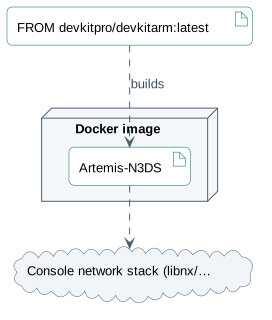
The outer node is where the code runs. Each base image points to what it builds, solid arrows lead to databases and dashed ones to outside services. Rendered with uml-mcp.
PlantUML source
@startuml
skinparam backgroundColor transparent
skinparam shadowing false
skinparam roundCorner 10
skinparam defaultFontName Arial
skinparam defaultFontSize 13
skinparam ArrowColor #4e6070
skinparam ArrowFontColor #3d4f5f
skinparam titleFontSize 14
skinparam actorBorderColor #006a62
skinparam actorBackgroundColor #e9f3f4
skinparam usecaseBorderColor #006a62
skinparam usecaseBackgroundColor #e9f3f4
skinparam componentBorderColor #006a62
skinparam componentBackgroundColor #e9f3f4
skinparam interfaceBorderColor #006a62
skinparam interfaceBackgroundColor #ffffff
skinparam nodeBorderColor #4e6070
skinparam nodeBackgroundColor #f4f8fb
skinparam databaseBorderColor #006a62
skinparam databaseBackgroundColor #ffffff
skinparam cloudBorderColor #4e6070
skinparam cloudBackgroundColor #f0f5fa
skinparam artifactBorderColor #006a62
skinparam artifactBackgroundColor #ffffff
skinparam rectangleBorderColor #b0c2d3
skinparam activityBorderColor #006a62
skinparam activityBackgroundColor #e9f3f4
skinparam partitionBorderColor #b0c2d3
skinparam stereotypeCBackgroundColor #ffffff
node "Docker image" as H {
  artifact "Artemis-N3DS" as APP
}
artifact "FROM devkitpro/devkitarm:latest" as IMG0
IMG0 ..> APP : builds
cloud "Console network stack (libnx/…" as E0
APP ..> E0
@enduml
Where it runs
Published to
Docker base images
7.12. Security
Controls
7.13. Testing
- Test files
- 1
- Source files
- 123
- Unit tests
- 1
No measured coverage report in the analyzed sources.
Where the tests are
tests 1
Nothing found for: Public interface, Database, Monitoring.
8. Deployment and operations
The ports, storage, and startup relationships below come from the repository configuration. depends_on records startup order, not service readiness.
9. Types and file structure
77 declared types, with 12 in the base-relationship overview.
Type diagram
classDiagram
direction TB
class tc0387bd4c68b["SelectedHost"] {
  <<struct>>
}
class t72fa5c6e15be["RemoteApp"] {
  <<struct>>
}
class tf7c6d6aec7da["InputLoopContext"] {
  <<struct>>
}
class ta7f589e4be09["VideoDecoderBase"] {
  accept()
  _accept_touch_state_changed()
  _accept_keyboard_state_changed()
}
class tb2f58dc75feb["MockVideoDecoder"] {
}
class t391f53097446["SoftVideoDecoder"] {
  submit_decode_unit()
  _write_yuv_to_framebuffer()
}
class t4ad2ea8a811e["MvdDecoder"] {
  submit_decode_unit()
  _decode()
}
class t891d7e467987["_SERVER_DATA"] {
  <<struct>>
}
class ta59617f1a5fa["cb_ctx"] {
  <<struct>>
}
class tcb0c88684e67["_HTTP_DATA"] {
  <<struct>>
}
class taa2e3cf225d0["_CERT_KEY_PAIR"] {
  <<struct>>
}
class t91f7677e0266["xml_query"] {
  <<struct>>
}
class b34b203f09b57["ISubscriber"] {
  <<unresolved_base>>
}
b34b203f09b57 <|-- ta7f589e4be09
ta7f589e4be09 <|-- tb2f58dc75feb
ta7f589e4be09 <|-- t391f53097446
ta7f589e4be09 <|-- t4ad2ea8a811e
Unresolved bases remain labelled; full signatures are not reconstructed.
10. Reference
101 / 101 eligible files read (174 in the tree); 0 oversized, 0 failed reads and 6 syntax diagnostics.
What the scan covers
Known dependency/build folders, credential files and binaries are excluded. The scan covers READMEs, recognized manifests and parser-supported source files.
Linguist statistics cover the whole repository and may include other languages.
12. Files to read 3
13. Glossary
Repository
The versioned source files, configuration, and history of a project.
README
The repository’s entry document, usually covering its purpose and initial setup.
Dependency
A library, tool, or service that another component needs to build or run.
Session
State kept across related requests, often to track a signed-in user. Authentication and permission checks remain separate concerns.
Container
An isolated process environment created from an image. Persistent data needs storage outside the container’s disposable filesystem.
Published port
A host port mapped to a service’s container port. Publishing a port can expose that service beyond its container network.
CLI
A text interface in which commands and arguments select operations. Exit codes let scripts detect success or failure.
Build
The steps that turn source files and dependencies into a runnable program or distributable artifact.
GPU
A processor designed for parallel workloads, including graphics rendering and many numerical operations.
Video decoder
A component that reconstructs video frames from a compressed stream. Decoding and displaying a frame are separate stages.
Backend
An implementation behind a shared interface. Depending on context, it can mean a server-side service or a graphics, input, or storage implementation.
14. References
- antoinebou12. (2026, November 5). Artemis-N3DS. [Software repository] github.com.
- antoinebou12. (2026, November 5). Artemis-N3DS: README. [Repository documentation] github.com.
- antoinebou12. (2026, November 5). src/n3ds_main.cpp. [Source file] github.com.
- antoinebou12. (2026, November 5). src/hardware_capabilities.cpp. [Source file] github.com.
- antoinebou12. (2026, November 5). src/video/video.hpp. [Source file] github.com.
- Boucher, A. (2026, September 2). Handheld streaming and homebrew — Artemis-Switch, moonlight-N3DS, sm64coopdx-switch. [Project article] antoineboucher.info.
- Boucher, A. (2026, September 2). moonlight-N3DS. [Project article] antoineboucher.info.
- Boucher, A. (2026, October 23). Artemis-N3DS: Streaming within a dual-screen client. [Project article] antoineboucher.info.
Sources without a publication date show the date they were last checked, November 5, 2026. File links retain the inspected revision where available.